Ultime novità
Nuove funzionalità, miglioramenti e annunci dal team di Vector Witch
Meet the Vectorizer: Any Image to Clean SVG
Hi everyone! Meet the Vectorizer, our new tool that turns your images into clean, editable SVG files.
Upload and Convert
Drop in a PNG, JPG, WEBP or AVIF image and the Vectorizer figures out what kind of image it is. Black and white line art, colorful illustrations and photos each get their own conversion, so you never have to pick a setting. Watch the video above to see it turn a colorful illustration and a black and white design into vectors.
Smooth Curves, Real Vector Paths
Your result is made of smooth Bézier curves with sharp corners where they belong. Colors come out as separate layers, and every part can be opened in the editor, where each shape is selectable on its own. Your files are ready for Cricut, laser cutting and printing at any size.
Unlimited with Your Plan
Every VectorWitch plan includes unlimited Vectorizer conversions, SVG downloads and editing. Converted something before subscribing? You can download it right after you pick a plan.
Tip for Small Images
For the best result, the long side of your image should be at least 500 px. If your image is smaller or blurry, use the “Upscale first” button in the converter and the Vectorizer will take it from there.
Find it at the top of the Tools menu. Happy creating! ❤️
Meet the Vectorizer: Any Image to Clean SVG
Hi everyone! Meet the Vectorizer, our new tool that turns your images into clean, editable SVG files.
Upload and Convert
Drop in a PNG, JPG, WEBP or AVIF image and the Vectorizer figures out what kind of image it is. Black and white line art, colorful illustrations and photos each get their own conversion, so you never have to pick a setting. Watch the video above to see it turn a colorful illustration and a black and white design into vectors.
Smooth Curves, Real Vector Paths
Your result is made of smooth Bézier curves with sharp corners where they belong. Colors come out as separate layers, and every part can be opened in the editor, where each shape is selectable on its own. Your files are ready for Cricut, laser cutting and printing at any size.
Unlimited with Your Plan
Every VectorWitch plan includes unlimited Vectorizer conversions, SVG downloads and editing. Converted something before subscribing? You can download it right after you pick a plan.
Tip for Small Images
For the best result, the long side of your image should be at least 500 px. If your image is smaller or blurry, use the “Upscale first” button in the converter and the Vectorizer will take it from there.
Find it at the top of the Tools menu. Happy creating! ❤️
Smoother SVG Files and iPhone Photo Uploads
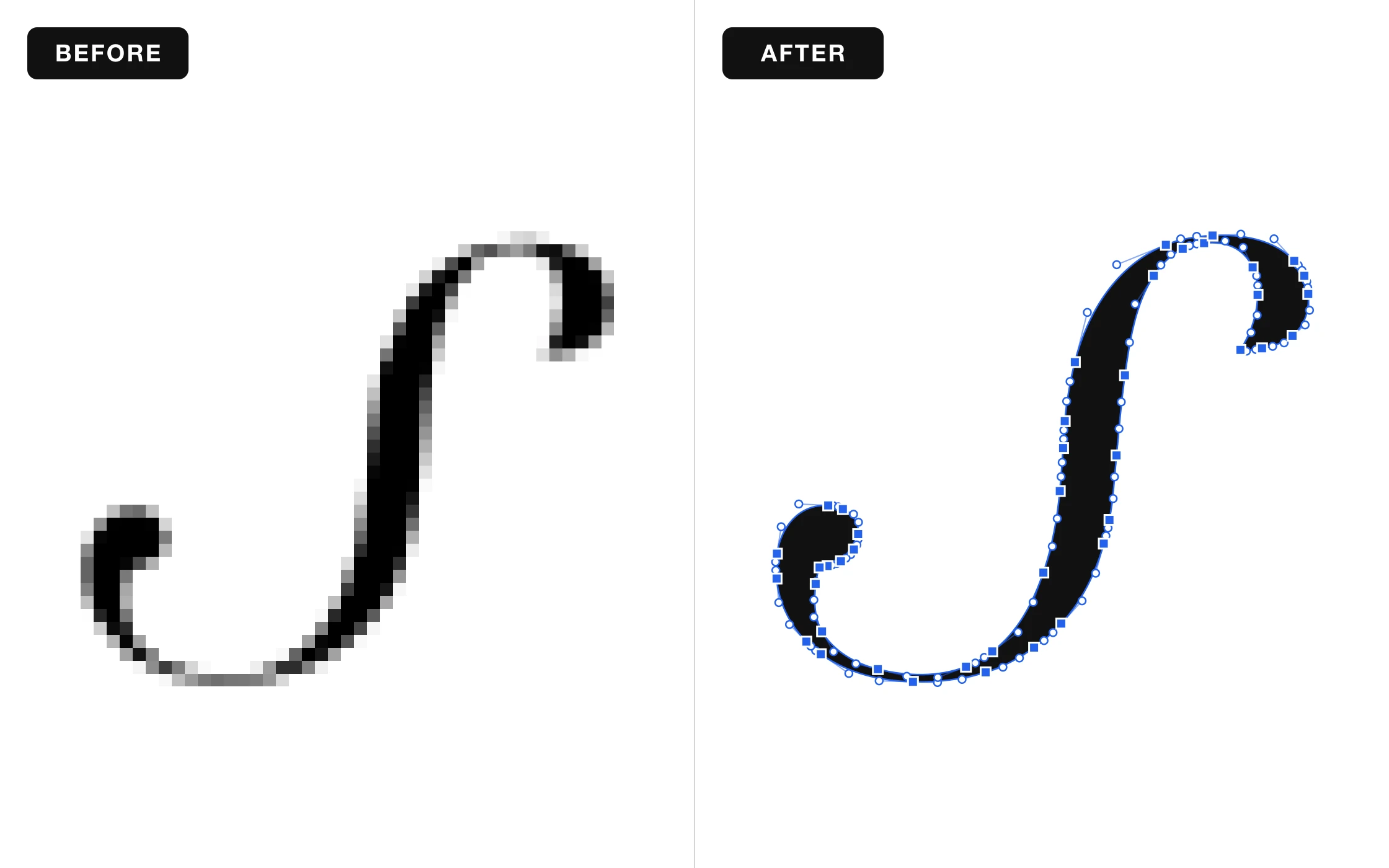
Hi everyone! We have two nice improvements for you today.
Smoother, Cleaner SVG Files
Your SVG files now come out smoother and cleaner. Curves look more natural, edges stay sharp, and your designs are easier to edit and ready for your Cricut, laser, or printer.
Upload Photos from Your iPhone
You can now upload iPhone photos (HEIC) directly. No need to convert them first, just pick a photo and start creating.
Nothing to set up, it all works automatically. Happy creating! ❤️
Smoother SVG Files and iPhone Photo Uploads
Hi everyone! We have two nice improvements for you today.
Smoother, Cleaner SVG Files
Your SVG files now come out smoother and cleaner. Curves look more natural, edges stay sharp, and your designs are easier to edit and ready for your Cricut, laser, or printer.
Upload Photos from Your iPhone
You can now upload iPhone photos (HEIC) directly. No need to convert them first, just pick a photo and start creating.
Nothing to set up, it all works automatically. Happy creating! ❤️
Give Your Photos a Goofy Side with Goofy Doodle
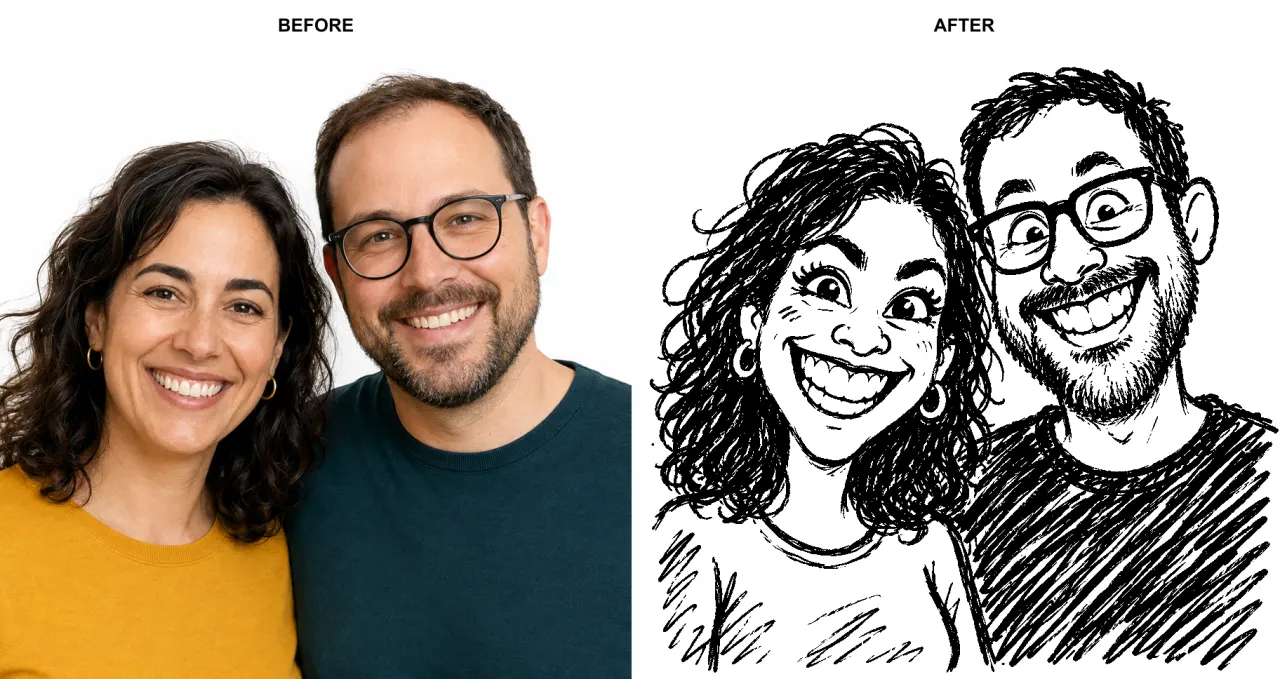
Hi everyone! Meet Goofy Doodle, our new style for turning your photos and ideas into funny, deliberately imperfect drawings.
Familiar faces get a wonderfully silly twist, with big grins, exaggerated expressions, and the charm of a quick sketch made to make you laugh. The aim is to keep the resemblance while bringing out the funny side.
See the transformation in the before-and-after example above, then try your own.
Upload an image or describe your idea, choose Goofy Doodle in the workspace, and let the doodling begin.
Happy creating! ❤️
Give Your Photos a Goofy Side with Goofy Doodle
Hi everyone! Meet Goofy Doodle, our new style for turning your photos and ideas into funny, deliberately imperfect drawings.
Familiar faces get a wonderfully silly twist, with big grins, exaggerated expressions, and the charm of a quick sketch made to make you laugh. The aim is to keep the resemblance while bringing out the funny side.
See the transformation in the before-and-after example above, then try your own.
Upload an image or describe your idea, choose Goofy Doodle in the workspace, and let the doodling begin.
Happy creating! ❤️
Introducing the Scratchboard Style
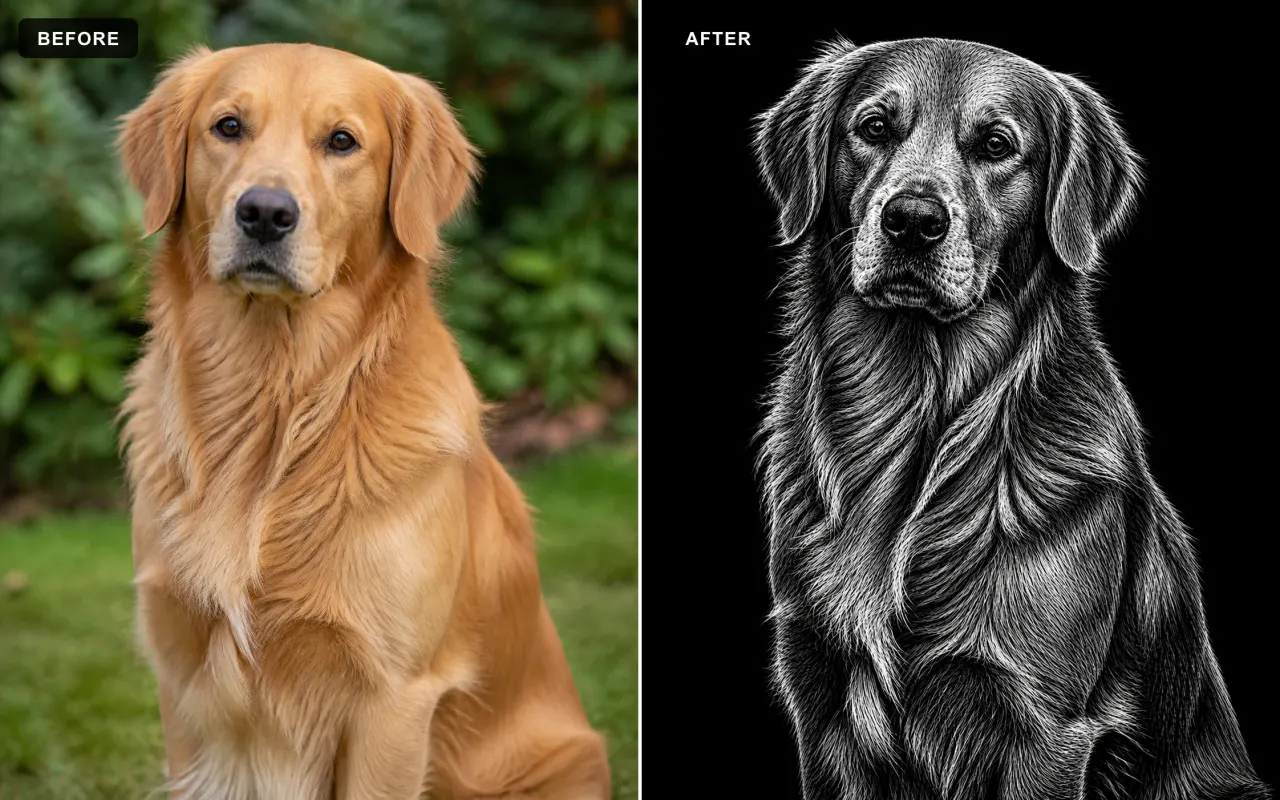
Hi everyone! We’ve added Scratchboard, a new style that gives your ideas and uploaded images the unmistakable look of artwork scratched from black ink.
What Is Scratchboard?
Traditional scratchboard starts with a white clay-coated board covered in black ink. Artists use sharp tools to remove the black surface and reveal the white layer underneath. Every highlight, texture, and fine detail is created through the marks that are scratched away.
White Marks, Deep Black
Our Scratchboard style recreates that reverse-drawing process digitally. Fine white scratches shape fur, hair, faces, fabric, metal, and scenery against a rich black surface. More marks reveal the light, while untouched areas stay black, producing dramatic contrast and a classic engraved finish.
Create from a Prompt or an Image
Describe what you want to create, or upload an image and Scratchboard will rebuild the subject and scene in this carved black-and-white technique. It is more than a black-and-white filter: the image is recreated through thousands of fine scratch marks. Ask to remove the background and your subject will appear against a clean solid-black backdrop.
Made for Bold, Detailed Artwork
Scratchboard works especially well for portraits, pets, wildlife, gothic themes, emblems, keepsakes, posters, and engraving-inspired designs.
Open the workspace and try Scratchboard today. Happy creating! ❤️
Introducing the Scratchboard Style
Hi everyone! We’ve added Scratchboard, a new style that gives your ideas and uploaded images the unmistakable look of artwork scratched from black ink.
What Is Scratchboard?
Traditional scratchboard starts with a white clay-coated board covered in black ink. Artists use sharp tools to remove the black surface and reveal the white layer underneath. Every highlight, texture, and fine detail is created through the marks that are scratched away.
White Marks, Deep Black
Our Scratchboard style recreates that reverse-drawing process digitally. Fine white scratches shape fur, hair, faces, fabric, metal, and scenery against a rich black surface. More marks reveal the light, while untouched areas stay black, producing dramatic contrast and a classic engraved finish.
Create from a Prompt or an Image
Describe what you want to create, or upload an image and Scratchboard will rebuild the subject and scene in this carved black-and-white technique. It is more than a black-and-white filter: the image is recreated through thousands of fine scratch marks. Ask to remove the background and your subject will appear against a clean solid-black backdrop.
Made for Bold, Detailed Artwork
Scratchboard works especially well for portraits, pets, wildlife, gothic themes, emblems, keepsakes, posters, and engraving-inspired designs.
Open the workspace and try Scratchboard today. Happy creating! ❤️
Ti presentiamo lo stile Stipple
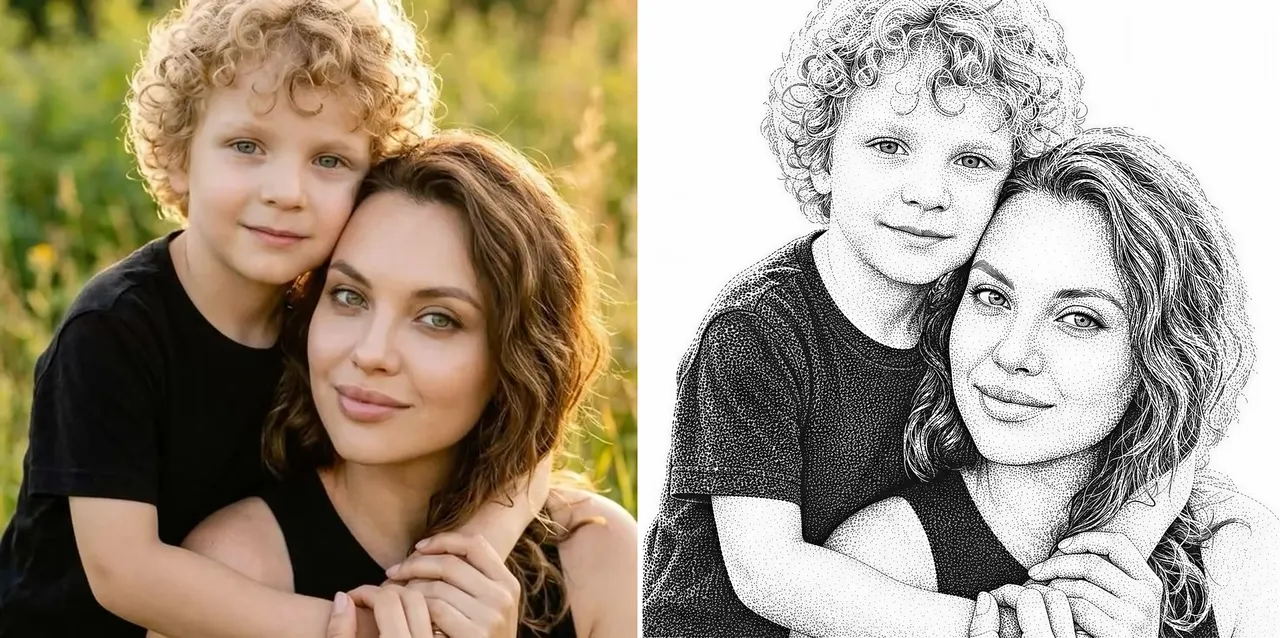
Ciao a tutti! Abbiamo appena aggiunto Stipple, un nuovo stile che trasforma i tuoi prompt e le tue foto in classiche incisioni a puntinato. È la stessa tecnica dotwork che vedi sui ritratti delle banconote e nelle stampe d'epoca.
Toni costruiti interamente con i punti
Stipple disegna ogni immagine con migliaia di minuscoli punti di inchiostro nero. I gruppi densi formano le ombre, i punti radi mantengono ariose le luci e brevi tratti direzionali modellano capelli e ciglia. Funziona magnificamente per ritratti, animali e ricordi ricchi di dettagli.
Fatto per l'incisione laser
L'opera è già composta da puri punti su uno sfondo bianco pulito, quindi si incide alla perfezione su legno, cuoio e ardesia senza alcuna configurazione extra di dithering.
Crea da un prompt o da un'immagine
Descrivi quello che vuoi creare, oppure carica una foto e Stipple la ridisegnerà mantenendo intatti soggetto, posa e inquadratura. Seleziona Stipple nel workspace e genera come al solito.
Apri il workspace e prova Stipple oggi stesso. Buona creazione! ❤️
Ti presentiamo lo stile Stipple
Ciao a tutti! Abbiamo appena aggiunto Stipple, un nuovo stile che trasforma i tuoi prompt e le tue foto in classiche incisioni a puntinato. È la stessa tecnica dotwork che vedi sui ritratti delle banconote e nelle stampe d'epoca.
Toni costruiti interamente con i punti
Stipple disegna ogni immagine con migliaia di minuscoli punti di inchiostro nero. I gruppi densi formano le ombre, i punti radi mantengono ariose le luci e brevi tratti direzionali modellano capelli e ciglia. Funziona magnificamente per ritratti, animali e ricordi ricchi di dettagli.
Fatto per l'incisione laser
L'opera è già composta da puri punti su uno sfondo bianco pulito, quindi si incide alla perfezione su legno, cuoio e ardesia senza alcuna configurazione extra di dithering.
Crea da un prompt o da un'immagine
Descrivi quello che vuoi creare, oppure carica una foto e Stipple la ridisegnerà mantenendo intatti soggetto, posa e inquadratura. Seleziona Stipple nel workspace e genera come al solito.
Apri il workspace e prova Stipple oggi stesso. Buona creazione! ❤️
SVG Editor: rimozione del bianco in un clic
Ciao a tutti! Abbiamo migliorato l'SVG Editor con una nuova pulizia in un clic per le opere SVG in bianco e nero.
Rimuovi il bianco in un clic
Apri qualsiasi SVG e clicca Rimuovi bianco nella barra degli strumenti in alto. L'editor elimina le forme bianche dall'intero design preservando le parti nere.
Ritagli trasparenti puliti
Le aree bianche diventano veri spazi negativi trasparenti invece di essere semplicemente ricolorate, e il risultato è pronto per taglio laser, vinile, stampa e ulteriori modifiche.
Funziona sugli SVG complessi
La pulizia gestisce le opere multi-tracciato in un solo passaggio e combina il risultato in un unico tracciato composto per un pannello Oggetti più ordinato.
Annulla e ripristina inclusi
L'operazione viene aggiunta alla cronologia dell'editor, così puoi annullarla o riapplicarla quando vuoi.
Apri un design nell'SVG Editor e prova Rimuovi bianco dalla barra degli strumenti in alto. Buona creazione! ❤️
SVG Editor: rimozione del bianco in un clic
Ciao a tutti! Abbiamo migliorato l'SVG Editor con una nuova pulizia in un clic per le opere SVG in bianco e nero.
Rimuovi il bianco in un clic
Apri qualsiasi SVG e clicca Rimuovi bianco nella barra degli strumenti in alto. L'editor elimina le forme bianche dall'intero design preservando le parti nere.
Ritagli trasparenti puliti
Le aree bianche diventano veri spazi negativi trasparenti invece di essere semplicemente ricolorate, e il risultato è pronto per taglio laser, vinile, stampa e ulteriori modifiche.
Funziona sugli SVG complessi
La pulizia gestisce le opere multi-tracciato in un solo passaggio e combina il risultato in un unico tracciato composto per un pannello Oggetti più ordinato.
Annulla e ripristina inclusi
L'operazione viene aggiunta alla cronologia dell'editor, così puoi annullarla o riapplicarla quando vuoi.
Apri un design nell'SVG Editor e prova Rimuovi bianco dalla barra degli strumenti in alto. Buona creazione! ❤️
Ti presentiamo l'Halftone Generator
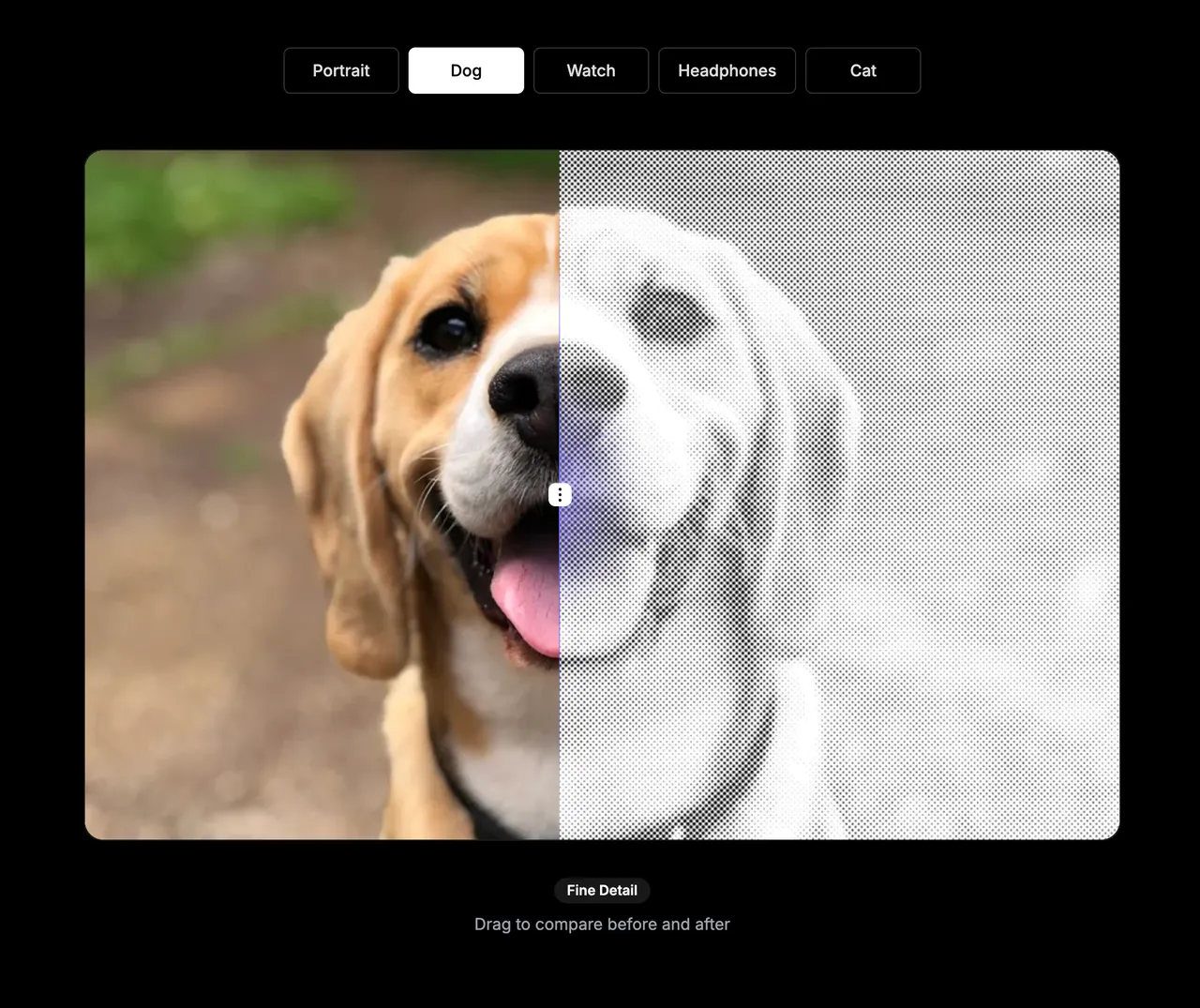
Il mezzotono è una tecnica che trasforma un'immagine in un motivo fatto di punti, quadrati o linee. Le aree più scure usano segni più grandi o più ravvicinati, mentre le aree più chiare usano segni più piccoli o più distanziati. È molto usato nella stampa, nei poster, nell'incisione e nel design decorativo.
Abbiamo aggiunto un nuovo Halftone Generator a VectorWitch. Trasforma qualsiasi foto o immagine in un design a mezzitoni personalizzabile, direttamente nel tuo browser.
Scegli il tuo stile di mezzitoni
Crea classici motivi a punti, decisi motivi a quadrati o mezzitoni a linee. Regola spaziatura, angolo, scala di punti o linee, luminosità, contrasto e inversione finché il risultato non ti convince.
Anteprima istantanea di ogni modifica
Carica un'immagine JPG, PNG o WebP e guarda l'effetto aggiornarsi in tempo reale. L'immagine di origine resta sul tuo dispositivo, così puoi sperimentare in modo rapido e privato.
Parti dai preset
Usa un preset per i dettagli fini, per un look da poster deciso o per l'incisione a linee, poi perfeziona le impostazioni per creare il tuo stile.
Esporta il risultato a modo tuo
Scarica il tuo mezzitoni finito come file PNG, JPG, BMP o SVG. L'esportazione SVG crea un motivo vettoriale utile per ulteriori modifiche, mentre i formati raster sono comodi per i flussi di lavoro di design e immagini di tutti i giorni.
Gratis da usare
L'Halftone Generator è completamente gratuito e non consuma crediti. Aprilo dal menu Strumenti e trasforma la tua prossima immagine in un design a mezzitoni.
Buon divertimento creativo! ❤️
Ti presentiamo l'Halftone Generator
Il mezzotono è una tecnica che trasforma un'immagine in un motivo fatto di punti, quadrati o linee. Le aree più scure usano segni più grandi o più ravvicinati, mentre le aree più chiare usano segni più piccoli o più distanziati. È molto usato nella stampa, nei poster, nell'incisione e nel design decorativo.
Abbiamo aggiunto un nuovo Halftone Generator a VectorWitch. Trasforma qualsiasi foto o immagine in un design a mezzitoni personalizzabile, direttamente nel tuo browser.
Scegli il tuo stile di mezzitoni
Crea classici motivi a punti, decisi motivi a quadrati o mezzitoni a linee. Regola spaziatura, angolo, scala di punti o linee, luminosità, contrasto e inversione finché il risultato non ti convince.
Anteprima istantanea di ogni modifica
Carica un'immagine JPG, PNG o WebP e guarda l'effetto aggiornarsi in tempo reale. L'immagine di origine resta sul tuo dispositivo, così puoi sperimentare in modo rapido e privato.
Parti dai preset
Usa un preset per i dettagli fini, per un look da poster deciso o per l'incisione a linee, poi perfeziona le impostazioni per creare il tuo stile.
Esporta il risultato a modo tuo
Scarica il tuo mezzitoni finito come file PNG, JPG, BMP o SVG. L'esportazione SVG crea un motivo vettoriale utile per ulteriori modifiche, mentre i formati raster sono comodi per i flussi di lavoro di design e immagini di tutti i giorni.
Gratis da usare
L'Halftone Generator è completamente gratuito e non consuma crediti. Aprilo dal menu Strumenti e trasforma la tua prossima immagine in un design a mezzitoni.
Buon divertimento creativo! ❤️
Ti presentiamo lo stile Master Pencil
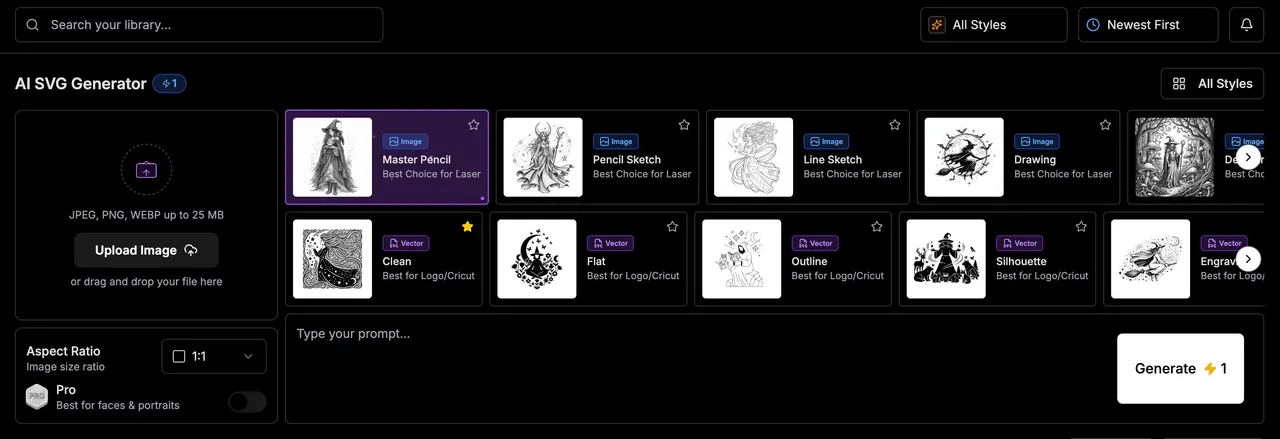
Ciao a tutti! Abbiamo aggiunto Master Pencil, un nuovo stile per creare raffinate opere in grafite monocromatica, ricche di dettagli e con una finitura naturale disegnata a mano.
Opere in grafite dettagliate
Master Pencil combina contorni precisi, ombreggiature a matita stratificate, tratteggi incrociati e una sottile texture di carta per creare illustrazioni in bianco e nero curate. Funziona particolarmente bene per ritratti, personaggi, animali, architettura e opere decorative.
Crea da un prompt o da un'immagine
Descrivi quello che vuoi creare, oppure carica un'immagine per trasformarla preservando soggetto, posa, inquadratura e dettagli importanti. Seleziona Master Pencil nel workspace e genera come al solito.
Apri il workspace e prova Master Pencil oggi stesso. Buona creazione! ❤️
Ti presentiamo lo stile Master Pencil
Ciao a tutti! Abbiamo aggiunto Master Pencil, un nuovo stile per creare raffinate opere in grafite monocromatica, ricche di dettagli e con una finitura naturale disegnata a mano.
Opere in grafite dettagliate
Master Pencil combina contorni precisi, ombreggiature a matita stratificate, tratteggi incrociati e una sottile texture di carta per creare illustrazioni in bianco e nero curate. Funziona particolarmente bene per ritratti, personaggi, animali, architettura e opere decorative.
Crea da un prompt o da un'immagine
Descrivi quello che vuoi creare, oppure carica un'immagine per trasformarla preservando soggetto, posa, inquadratura e dettagli importanti. Seleziona Master Pencil nel workspace e genera come al solito.
Apri il workspace e prova Master Pencil oggi stesso. Buona creazione! ❤️
SVG Editor: trasformazioni del testo
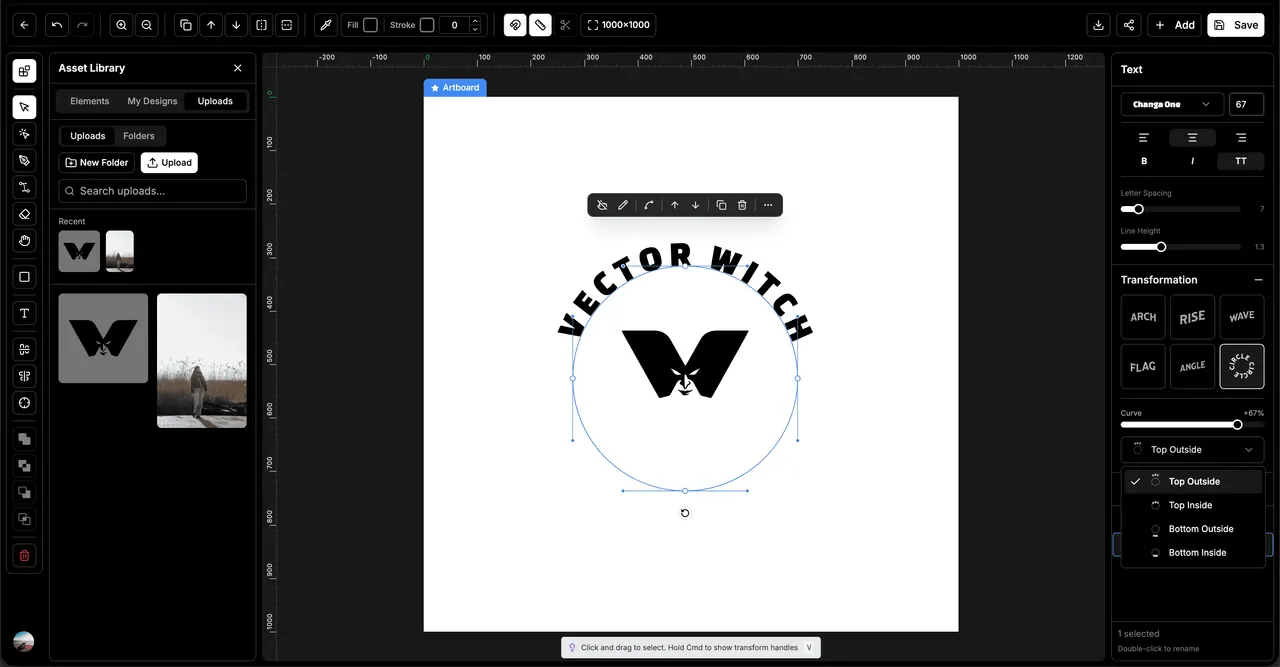
Ciao a tutti! Abbiamo aggiunto le trasformazioni del testo modificabili all'SVG Editor. Ora puoi curvare e modellare il testo mantenendo modificabili il font originale e il contenuto.
Sei stili di trasformazione
Scegli tra Arco, Ascesa, Onda, Bandiera, Angolo e Cerchio. Usa il cursore Curva per perfezionare l'effetto e creare di tutto, dalle curve delicate alla tipografia audace ed espressiva.
Testo circolare flessibile
Il testo a cerchio ora include quattro posizioni precise: esterno in alto, interno in alto, esterno in basso e interno in basso. Scegli una posizione dal nuovo menu a tendina per creare badge, sigilli, loghi e design circolari esattamente come li vuoi.
Mantieni i font modificabili
Le trasformazioni preservano testo originale, famiglia di font, peso, stile, spaziatura e allineamento. Puoi cambiare le parole o il font in seguito senza ricostruire il design o convertire ogni lettera in un tracciato separato.
Gruppi e cronologia affidabili
Raggruppa, separa, annulla e ripristina ora mantengono il testo trasformato unito come oggetto modificabile. Le tue lettere restano in ordine e, muovendoti nella cronologia, ogni trasformazione e posizione circolare viene ripristinata correttamente.
Apri un design nell'SVG Editor, seleziona un oggetto di testo ed esplora il nuovo pannello Trasformazione. Buona creazione! ❤️
SVG Editor: trasformazioni del testo
Ciao a tutti! Abbiamo aggiunto le trasformazioni del testo modificabili all'SVG Editor. Ora puoi curvare e modellare il testo mantenendo modificabili il font originale e il contenuto.
Sei stili di trasformazione
Scegli tra Arco, Ascesa, Onda, Bandiera, Angolo e Cerchio. Usa il cursore Curva per perfezionare l'effetto e creare di tutto, dalle curve delicate alla tipografia audace ed espressiva.
Testo circolare flessibile
Il testo a cerchio ora include quattro posizioni precise: esterno in alto, interno in alto, esterno in basso e interno in basso. Scegli una posizione dal nuovo menu a tendina per creare badge, sigilli, loghi e design circolari esattamente come li vuoi.
Mantieni i font modificabili
Le trasformazioni preservano testo originale, famiglia di font, peso, stile, spaziatura e allineamento. Puoi cambiare le parole o il font in seguito senza ricostruire il design o convertire ogni lettera in un tracciato separato.
Gruppi e cronologia affidabili
Raggruppa, separa, annulla e ripristina ora mantengono il testo trasformato unito come oggetto modificabile. Le tue lettere restano in ordine e, muovendoti nella cronologia, ogni trasformazione e posizione circolare viene ripristinata correttamente.
Apri un design nell'SVG Editor, seleziona un oggetto di testo ed esplora il nuovo pannello Trasformazione. Buona creazione! ❤️
Arriva il supporto multilingua
Ciao a tutti! VectorWitch ora è disponibile in 8 lingue, così puoi creare nella lingua in cui ti senti più a tuo agio.
Scegli la tua lingua
Seleziona la lingua dal menu con le bandiere nella barra in alto. Su mobile la trovi nella barra in alto e anche in cima al menu. La tua scelta viene ricordata a ogni visita.
Otto lingue, tradotte al completo
English, Deutsch, Español, Français, Italiano, Português, Nederlands e Polski. Tutta l'interfaccia è tradotta, dal workspace e dall'editor fino a strumenti, prezzi e pagine di aiuto.
Buona creazione! ❤️
Arriva il supporto multilingua
Ciao a tutti! VectorWitch ora è disponibile in 8 lingue, così puoi creare nella lingua in cui ti senti più a tuo agio.
Scegli la tua lingua
Seleziona la lingua dal menu con le bandiere nella barra in alto. Su mobile la trovi nella barra in alto e anche in cima al menu. La tua scelta viene ricordata a ogni visita.
Otto lingue, tradotte al completo
English, Deutsch, Español, Français, Italiano, Português, Nederlands e Polski. Tutta l'interfaccia è tradotta, dal workspace e dall'editor fino a strumenti, prezzi e pagine di aiuto.
Buona creazione! ❤️