Créer des designs uniques et de haute qualité demande du temps et de l'argent. Que vous gériez une activité de gravure laser, vendiez sur Etsy, exploitiez une boutique de Print on Demand ou créiez du contenu pour des projets Cricut, le goulot d'étranglement du design est bien réel. Les heures passées à chercher des graphismes de stock, à payer des licences, à convertir des formats et à nettoyer des fichiers peuvent ruiner votre productivité et vos marges.
VectorWitch résout ce problème grâce à une génération de designs par IA qui produit des fichiers prêts pour la production dans plusieurs formats. Saisissez une description ou téléversez une image, et en quelques secondes vous obtenez des vecteurs SVG pour la découpe, des fichiers PNG pour la gravure laser détaillée et des sorties PDF pour un travail de production haute qualité. Ce n'est pas un simple outil de conversion de plus ; c'est un système complet de production de designs conçu pour les makers, les vendeurs et les entrepreneurs créatifs qui ont besoin de volume sans sacrifier la qualité.
Comprendre l'approche multi-format de VectorWitch
VectorWitch génère trois types de fichiers, chacun optimisé pour des usages spécifiques.
SVG (Scalable Vector Graphics) - Des tracés propres, sans aucune ligne en double, pour les machines de découpe comme Cricut et Silhouette. Redimensionnable à l'infini sans perte de qualité.
PNG (Portable Network Graphics) - Des images matricielles détaillées avec une profondeur en niveaux de gris pour la gravure laser sur bois, cuir, acrylique ou métal. Fonctionne directement dans LightBurn et LaserGRBL.
PDF (Portable Document Format) - Une sortie de haute qualité pour l'impression professionnelle et la production.
Une seule génération de design sert à plusieurs usages. Créez une fois, exportez dans le format dont vous avez besoin.
Comment fonctionne VectorWitch : trois étapes vers des designs prêts pour la production
Saisissez une description textuelle ou téléversez une image de référence (PNG, JPG ou JPEG). Choisissez parmi 12 styles répartis entre les catégories IMAGE (PNG/PDF) et VECTOR (SVG). Téléchargez votre fichier instantanément.
La plateforme est une Progressive Web App. Aucune installation de logiciel, elle fonctionne dans n'importe quel navigateur sur ordinateur de bureau, portable ou tablette.
Gravure laser : pourquoi le PNG et le PDF comptent
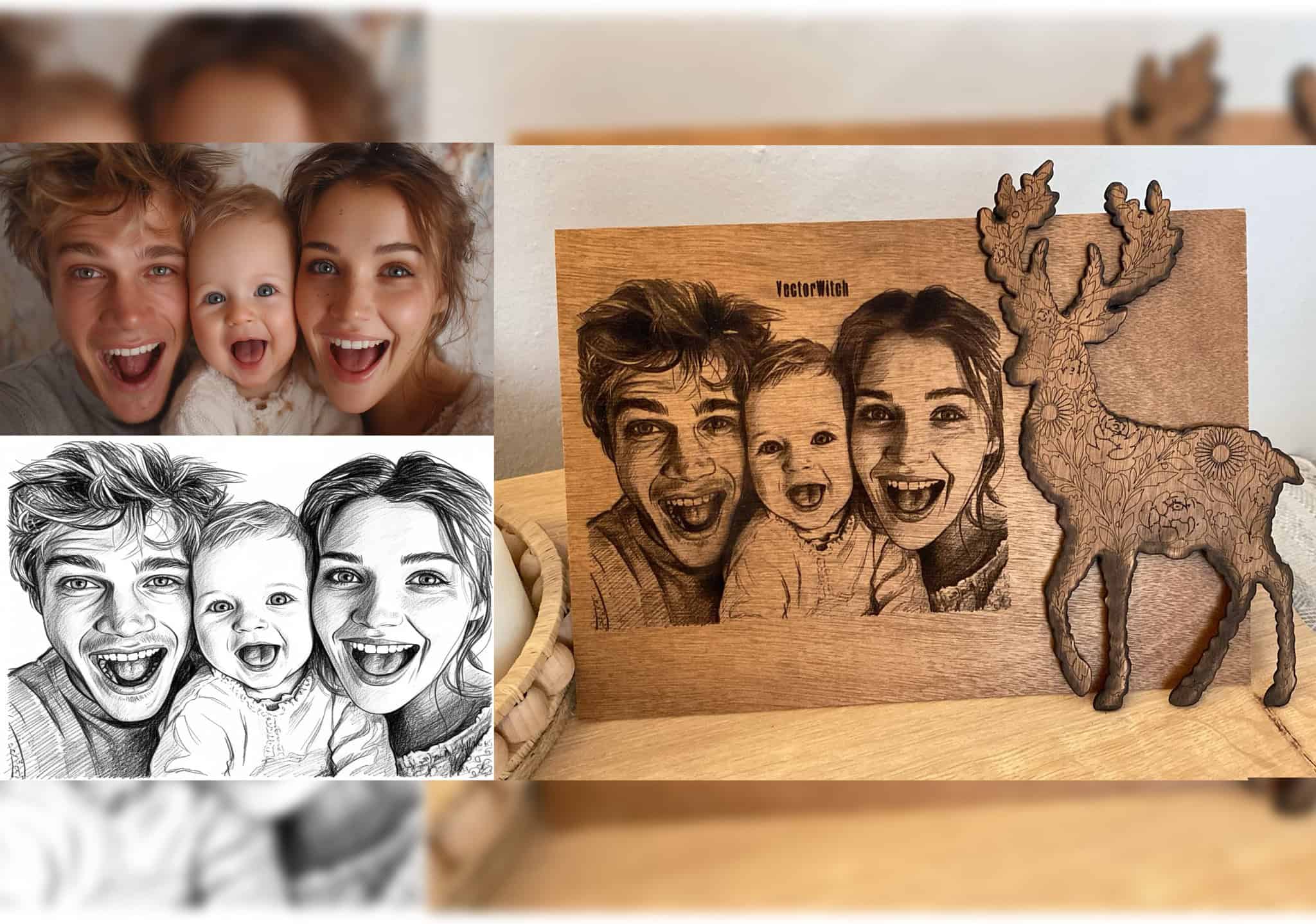
La gravure laser nécessite des informations en niveaux de gris pour contrôler la profondeur de brûlage et créer des effets photoréalistes. Les fichiers PNG contiennent les informations tonales dont votre laser a besoin pour la profondeur, la texture et les détails sur bois, cuir, acrylique ou métal.
Le style Engraving produit des rendus gravés classiques avec un travail de lignes détaillé. Les styles Pencil Sketch et Line Sketch génèrent des illustrations détaillées à base de lignes. Le style Drawing crée une esthétique dessinée à la main.
La sortie PDF conserve une haute résolution et peut être redimensionnée sans perte de qualité. De nombreux opérateurs la préfèrent pour les projets complexes.
Téléchargez votre PNG ou PDF, importez-le dans votre logiciel laser, réglez les paramètres et gravez.
Le SVG pour la découpe : Cricut, vinyle et découpe laser
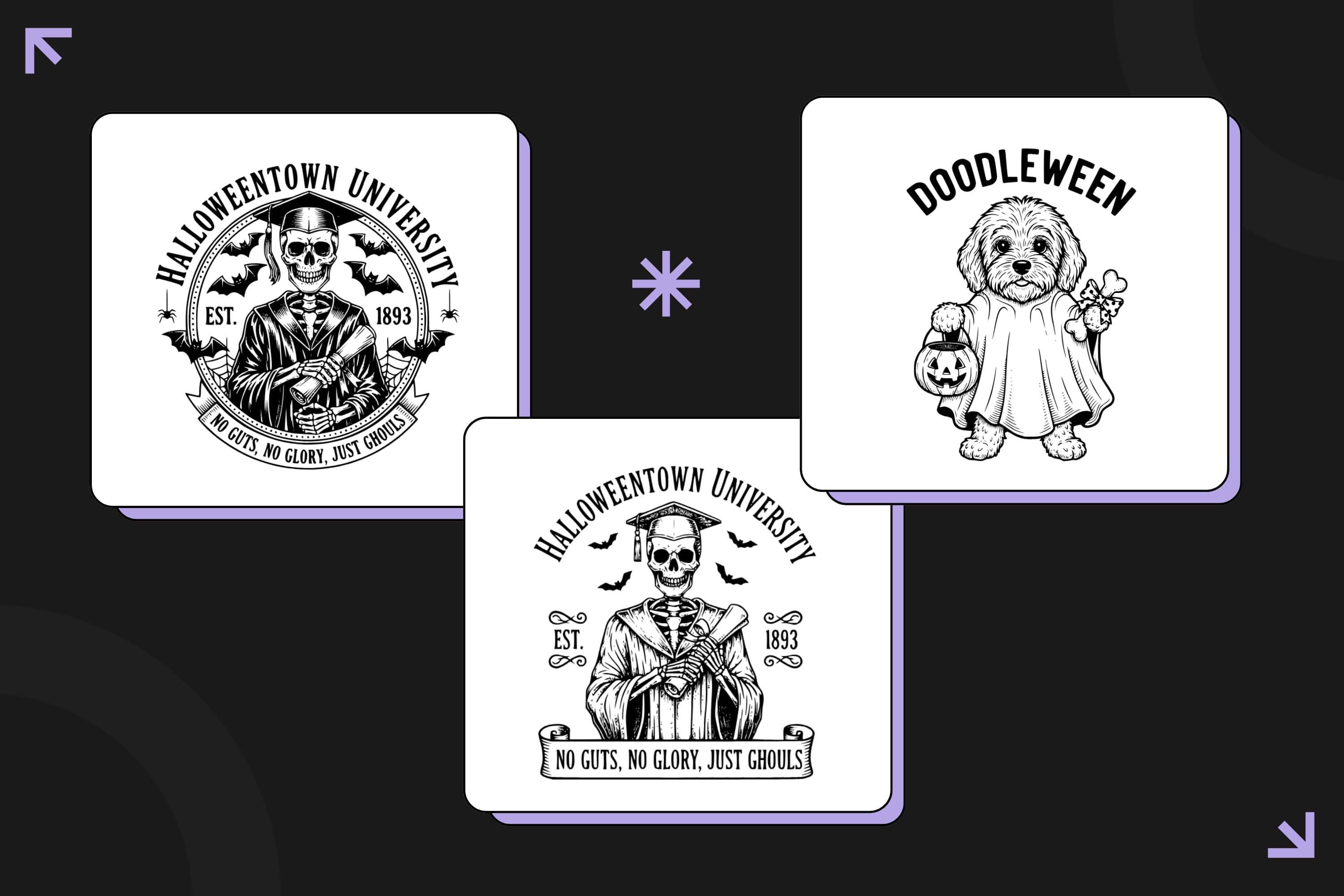
VectorWitch génère des fichiers SVG propres avec des tracés optimisés, zéro ligne en double et des fichiers très légers.
Le style Silhouette crée des formes pleines et marquées, parfaites pour la découpe de vinyle. Le style Flat Vector offre des formes géométriques minimalistes. Le style Outline génère des designs à base de lignes pour les projets de découpe détaillés.
Pour la découpe laser, la garantie zéro ligne en double assure que votre laser ne parcourt pas deux fois le même tracé, évitant la surchauffe et l'endommagement du matériau.
Compatible avec Cricut Design Space, Silhouette Studio, Inkscape, Adobe Illustrator, CorelDRAW, Figma et les logiciels CNC comme Easel et VCarve.
De vraies économies de temps et d'argent
VectorWitch réduit considérablement le temps et les coûts par rapport aux workflows de design traditionnels.
Les méthodes traditionnelles impliquent des heures de recherche de graphismes de stock, des frais de licence, des conversions de format et du nettoyage de fichiers. Comptez 2 à 4 heures et 10 à 150 dollars par design selon votre source.
Avec VectorWitch, vous saisissez un prompt, générez en quelques secondes, et votre fichier est prêt à être mis en ligne sur Etsy, les plateformes POD ou Cricut. Un résultat immédiat, prêt pour la production.
Cela représente une réduction de temps de plus de 95 % et une économie de coûts de 99 %. Pour les entreprises qui créent plusieurs designs par semaine, cela se traduit par des milliers de dollars économisés et des semaines de temps récupérées chaque année.
Print on Demand : la production en volume simplifiée
VectorWitch permet une production rapide de designs pour les vendeurs POD. Des utilisateurs rapportent créer plus de 50 à 100 designs uniques par jour.
Droits commerciaux complets inclus. Aucune attribution requise, utilisation libre de redevances. Vendez sur Etsy, Redbubble, TeePublic, Amazon Merch, Printful et Printify sans souci de droits d'auteur.
Fonctionne pour tous les produits POD : vêtements, articles pour la maison, accessoires, art mural et articles spécialisés.
Les douze styles : choisir le bon format
VectorWitch propose 12 styles répartis en deux catégories : 4 styles IMAGE (PNG/PDF) et 8 styles VECTOR (SVG).
Styles IMAGE (PNG/PDF pour la gravure laser)
Pencil Sketch - « Meilleur choix pour le laser ». Esthétique de dessin au crayon naturel avec des ombrages détaillés. Parfait pour la gravure laser photoréaliste sur bois, cuir et métal.
Line Sketch - « Meilleur choix pour le laser ». Illustration nette à base de lignes avec un rendu artistique. Idéal pour les projets de gravure laser nécessitant des lignes définies et de la texture.
Drawing - « Idéal pour le laser ». Esthétique organique dessinée à la main. Crée un rendu naturel et artisanal sur les matériaux gravés.
Engraving - « Meilleur choix pour le laser ». Apparence gravée classique avec hachures croisées. Esthétique gravée traditionnelle optimisée pour le bois et le métal.
Styles VECTOR (SVG pour la découpe)
Flat - « Idéal pour logo/Cricut ». Formes géométriques minimalistes. Des designs nets et modernes parfaits pour la découpe et l'image de marque.
Outline - « Idéal pour logo/Cricut ». Un trait élégant sans remplissage. Idéal pour les projets de découpe détaillés et le travail de logo.
Silhouette - « Idéal pour logo/Cricut ». Formes pleines et marquées sans contours. Conçu spécifiquement pour la découpe de vinyle, de papier et de matériaux.
Drawing - « Idéal pour logo/Cricut ». Style vectoriel dessiné à la main. Des lignes organiques en format vectoriel redimensionnable.
Linocut - « Idéal pour logo/Cricut ». Esthétique vintage de gravure sur bloc. Apparence rustique et texturée en format vectoriel.
Cartoon - « Idéal pour logo/Cricut ». Personnages ludiques avec des contours marqués. Des graphismes amusants pour les produits enfants et les articles décontractés.
Engraving - « Idéal pour logo/Cricut ». Rendu gravé classique en format vectoriel. Esthétique traditionnelle sous forme de tracés redimensionnables.
Freestyle - « Idéal pour logo/Cricut ». Vecteurs abstraits créatifs. Polyvalent pour les designs modernes et artistiques.
Convertir des images : du PNG/JPG vers plusieurs formats
Téléversez vos images PNG ou JPG existantes et convertissez-les en vecteurs SVG, en sorties PNG détaillées ou en PDF prêts à imprimer.
Le mode de génération hybride vous permet de téléverser une image de référence et d'ajouter une description textuelle pour modifier le style, la composition ou les détails. Par exemple, téléversez une photo de paysage et précisez « convertir en style Linocut, contraste élevé pour gravure laser ».
Contrairement aux outils de vectorisation automatique qui produisent des fichiers surchargés, l'IA de VectorWitch génère des sorties intelligentes et optimisées, adaptées au format choisi.
Intégration et compatibilité des formats
Fichiers SVG : Adobe Illustrator, Inkscape, CorelDRAW, Figma, Affinity Designer, Cricut Design Space, Silhouette Studio.
Fichiers PNG : LightBurn, LaserGRBL, RDWorks, Glowforge, Printful, Printify, Photoshop, GIMP.
Fichiers PDF : imprimeries professionnelles, Adobe Acrobat, workflows de présentation de design.
Le fonctionnement dans le cloud élimine tout besoin de stockage local et assure des mises à jour automatiques.
Tarifs et analyse de la valeur
VectorWitch propose trois formules d'abonnement. Le plan Starter coûte 10 dollars par mois pour 100 générations, soit 10 centimes par design. Le plan Basic est à 20 dollars par mois pour 300 générations, soit environ 6,7 centimes par design. Le plan Pro revient à 40 dollars par mois pour 800 générations, soit 5 centimes par design.
Comparez avec les coûts traditionnels. Les graphismes de stock coûtent généralement 10 à 50 dollars par design avec des restrictions de licence. Les services d'un graphiste vont de 50 à 150 dollars par design personnalisé. Les sites de graphismes de stock par abonnement facturent 15 à 30 dollars par mois pour des téléchargements limités. Le coût de 5 à 10 centimes de VectorWitch représente une réduction de 99 pour cent par rapport à ces options traditionnelles.
Le seuil de rentabilité est incroyablement rapide pour la plupart des utilisateurs. Si vous créez seulement 3 à 5 designs personnalisés par mois, VectorWitch est déjà rentabilisé par rapport à l'achat de graphismes de stock. Pour les boutiques à fort volume produisant 20 designs par semaine, les économies deviennent substantielles. Un seul design vendu couvre le coût de l'abonnement mensuel.
Les crédits fonctionnent sur le principe « à utiliser ou à perdre ». Les crédits mensuels sont réinitialisés à chaque cycle de facturation, sans report ni accumulation. Choisissez donc votre formule en fonction de votre volume mensuel habituel plutôt que d'essayer de stocker des crédits pour plus tard.
La galerie communautaire et les ressources gratuites
VectorWitch comprend une galerie communautaire où les utilisateurs partagent leurs créations. Cette galerie a plusieurs usages. Vous pouvez y chercher de l'inspiration, étudier comment différents prompts produisent différents résultats, et même télécharger gratuitement les designs de la communauté.
Tous les designs de la galerie communautaire sont libres de redevances avec une autorisation d'usage commercial complète. Aucune attribution requise. Cela fait de la galerie une ressource précieuse quand vous avez besoin de designs rapides pour des produits standards ou que vous voulez voir ce que l'outil permet avant de créer vos propres créations.
La galerie illustre aussi l'étendue des styles et des sujets que VectorWitch peut produire. Vous y trouverez de tout, des motifs de mandala complexes aux formes géométriques simples, des scènes de nature à l'art abstrait, de la typographie vintage au minimalisme moderne.
Conseils pour obtenir les meilleurs résultats
Soyez précis dans vos prompts. Au lieu de « un arbre », essayez « chêne avec branches détaillées, composition circulaire, adapté à la gravure laser ».
Mentionnez l'usage prévu. Des formulations comme « pour gravure laser sur bois » ou « optimisé pour découpe Cricut » aident l'IA à ajuster le niveau de détail.
Choisissez les styles IMAGE pour la gravure laser (PNG/PDF). Pencil Sketch, Line Sketch, Drawing ou Engraving produisent la profondeur en niveaux de gris nécessaire à la gravure.
Choisissez les styles VECTOR pour la découpe (SVG). Flat, Outline, Silhouette, Linocut, Cartoon, Drawing, Engraving ou Freestyle créent des tracés propres pour Cricut, le vinyle et la découpe laser.
Adaptez le format à l'application. Gravure laser : PNG ou PDF. Découpe : SVG. POD : selon le produit. Web : SVG pour les graphismes, PNG pour les réseaux sociaux.
Partez d'images de référence de haute qualité. Une meilleure entrée produit une meilleure sortie.
Testez d'abord à petite échelle. Faites des essais de gravure ou de découpe sur des chutes de matériau avant la production complète.
Téléchargez tous les formats pour les designs polyvalents. Gardez le SVG pour le redimensionnement, le PNG pour l'usage immédiat, le PDF pour l'archivage.
Qui devrait utiliser VectorWitch ?
VectorWitch est conçu pour les créateurs et les entreprises qui ont besoin d'une production de designs en grand volume sans sacrifier la qualité.
Parfait pour :
Les entreprises de gravure laser qui ont constamment besoin de nouveaux designs pour des commandes personnalisées. Les sorties PNG/PDF offrent la profondeur en niveaux de gris requise pour un travail de gravure professionnel.
Les vendeurs POD sur Etsy, Amazon, Redbubble qui doivent générer rapidement des designs uniques. Démarquez-vous avec des designs originaux que vos concurrents ne peuvent pas copier.
Les utilisateurs de Cricut et Silhouette qui créent des stickers en vinyle, des créations en papier et des projets textiles. Des fichiers SVG propres garantissent une découpe efficace à chaque fois.
Les vendeurs de produits numériques proposant des designs en téléchargement. Générez un inventaire illimité avec des droits commerciaux complets.
Les petites agences de design servant plusieurs clients. Multipliez votre capacité de production sans embaucher de designers supplémentaires.
Lancez-vous :
Essayez VectorWitch avec le plan Starter. Générez des designs dans différents styles et testez-les dans votre workflow réel. Constatez comment les économies de temps et d'argent transforment votre activité.
