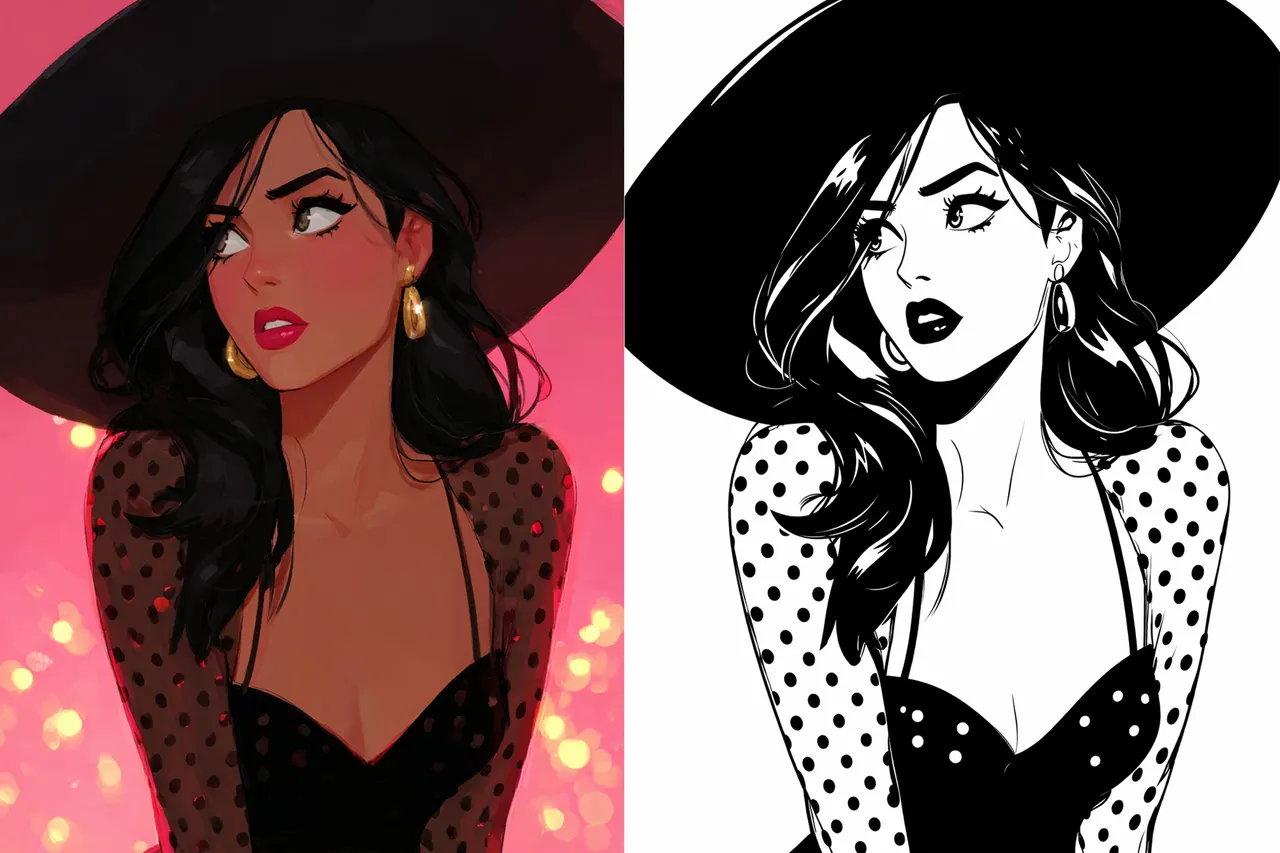
Arrêtez de réparer des fichiers SVG cassés. Convertissez-les proprement avec VectorWitch
La plupart des convertisseurs d'image en SVG se trompent sur un point.
Ils pensent que la conversion est le but.
Ce n'est pas le cas.
C'est l'utilisabilité qui compte.
Vous n'avez pas besoin d'un fichier SVG.
Vous avez besoin d'un SVG qui fonctionne vraiment en production.
C'est là que la plupart des outils échouent.
Le coût caché des fichiers SVG « presque bons »
Au premier abord, le résultat semble correct.
Puis vous zoomez.
Puis vous l'ouvrez dans votre outil de design.
Puis vous essayez de l'utiliser avec un laser ou une machine de découpe.
Et soudain :
les bords sont dentelés
les formes sont fragmentées
les tracés regorgent de nœuds inutiles
de petits artefacts apparaissent partout
Alors vous réparez.
Vous nettoyez les nœuds.
Vous reconnectez les tracés.
Vous reconstruisez des parties à la main.
Ce qui devait prendre quelques secondes se transforme en 20 minutes de nettoyage.
Voilà le vrai coût d'une mauvaise conversion SVG.
Pourquoi la plupart des convertisseurs d'image en SVG échouent
Convertir des pixels en tracés n'est pas un simple changement de format.
C'est un problème de reconstruction.
La plupart des outils se contentent de tracer ce qu'ils voient.
Ils ne comprennent pas la structure.
C'est pour cela que vous obtenez :
une explosion de nœuds au lieu de courbes lisses
des tracés cassés au lieu de formes continues
du bruit au lieu d'une géométrie propre
Le fichier est techniquement vectoriel.
Mais fonctionnellement inutilisable.
VectorWitch adopte une approche différente
VectorWitch n'est pas conçu pour « convertir des images ».
Il est conçu pour produire une géométrie vectorielle utilisable.
Cette distinction compte.
Au lieu de déverser des tracés bruts, VectorWitch se concentre sur :
la simplification des tracés sans détruire la forme
des courbures propres plutôt qu'une approximation dentelée
l'intégrité structurelle des formes
l'élimination du bruit à la source
L'objectif est simple.
Vous ne devriez pas avoir à toucher au fichier après le téléchargement.
Ce qui sort réellement de VectorWitch
C'est là que la différence devient évidente.
Un SVG VectorWitch est :
assez propre pour être gravé sans artefacts
assez simple pour être découpé sans erreurs
assez structuré pour être modifié sans frustration
Pas de segments cassés.
Pas de débris flottants.
Pas de désordre caché dans les tracés.
Juste une géométrie propre.
VectorWitch vs les outils SVG classiques
Il ne s'agit pas de fonctionnalités.
Il s'agit de la qualité du résultat.
Les convertisseurs classiques
privilégient la vitesse à la structure
produisent des tracés denses et désordonnés
nécessitent un nettoyage manuel
échouent dans les scénarios de production réels
VectorWitch
optimise intelligemment le nombre de nœuds
produit des tracés lisses et continus
élimine automatiquement les artefacts
fonctionne directement dans les workflows de gravure et de découpe
La plupart des outils vous donnent un point de départ.
VectorWitch vous donne un fichier fini.
Conçu spécifiquement pour la production
VectorWitch n'est pas un outil de design généraliste.
Il est fait pour ceux qui dépendent chaque jour de vecteurs propres.
les entreprises de gravure laser
les utilisateurs de Cricut et Silhouette
les vendeurs Etsy et print on demand
les designers travaillant avec des visuels en noir et blanc
Si votre production dépend de la précision, c'est là que la qualité de conversion compte vraiment.
Une différence concrète et mesurable
Avec un outil classique :
Vous convertissez un fichier et passez du temps à le réparer.
Avec VectorWitch :
Vous convertissez un fichier et vous l'utilisez.
Cette différence n'est pas cosmétique.
Elle se mesure en temps, en constance et en qualité de résultat.
Quand VectorWitch est le meilleur choix
VectorWitch ne cherche pas à tout remplacer.
Il se concentre sur un seul problème :
Transformer des images matricielles en fichiers SVG propres et prêts pour la production.
C'est le meilleur choix quand :
vous avez besoin de SVG pour la gravure ou la découpe laser
vous voulez un minimum de nœuds et des tracés lisses
vous ne voulez pas nettoyer les fichiers à la main
vous vous souciez de la qualité structurelle, pas seulement de l'apparence
Le mot de la fin
La plupart des convertisseurs SVG s'arrêtent à la conversion.
VectorWitch va un pas plus loin.
Il livre un fichier que vous pouvez vraiment utiliser.
Pas de corrections.
Pas de nettoyage.
Pas de temps perdu.
Téléversez votre image et obtenez un résultat propre dès le départ.