Laatste updates
Nieuwe functies, verbeteringen en aankondigingen van het Vector Witch team
Meet the Vectorizer: Any Image to Clean SVG
Hi everyone! Meet the Vectorizer, our new tool that turns your images into clean, editable SVG files.
Upload and Convert
Drop in a PNG, JPG, WEBP or AVIF image and the Vectorizer figures out what kind of image it is. Black and white line art, colorful illustrations and photos each get their own conversion, so you never have to pick a setting. Watch the video above to see it turn a colorful illustration and a black and white design into vectors.
Smooth Curves, Real Vector Paths
Your result is made of smooth Bézier curves with sharp corners where they belong. Colors come out as separate layers, and every part can be opened in the editor, where each shape is selectable on its own. Your files are ready for Cricut, laser cutting and printing at any size.
Unlimited with Your Plan
Every VectorWitch plan includes unlimited Vectorizer conversions, SVG downloads and editing. Converted something before subscribing? You can download it right after you pick a plan.
Tip for Small Images
For the best result, the long side of your image should be at least 500 px. If your image is smaller or blurry, use the “Upscale first” button in the converter and the Vectorizer will take it from there.
Find it at the top of the Tools menu. Happy creating! ❤️
Meet the Vectorizer: Any Image to Clean SVG
Hi everyone! Meet the Vectorizer, our new tool that turns your images into clean, editable SVG files.
Upload and Convert
Drop in a PNG, JPG, WEBP or AVIF image and the Vectorizer figures out what kind of image it is. Black and white line art, colorful illustrations and photos each get their own conversion, so you never have to pick a setting. Watch the video above to see it turn a colorful illustration and a black and white design into vectors.
Smooth Curves, Real Vector Paths
Your result is made of smooth Bézier curves with sharp corners where they belong. Colors come out as separate layers, and every part can be opened in the editor, where each shape is selectable on its own. Your files are ready for Cricut, laser cutting and printing at any size.
Unlimited with Your Plan
Every VectorWitch plan includes unlimited Vectorizer conversions, SVG downloads and editing. Converted something before subscribing? You can download it right after you pick a plan.
Tip for Small Images
For the best result, the long side of your image should be at least 500 px. If your image is smaller or blurry, use the “Upscale first” button in the converter and the Vectorizer will take it from there.
Find it at the top of the Tools menu. Happy creating! ❤️
Smoother SVG Files and iPhone Photo Uploads
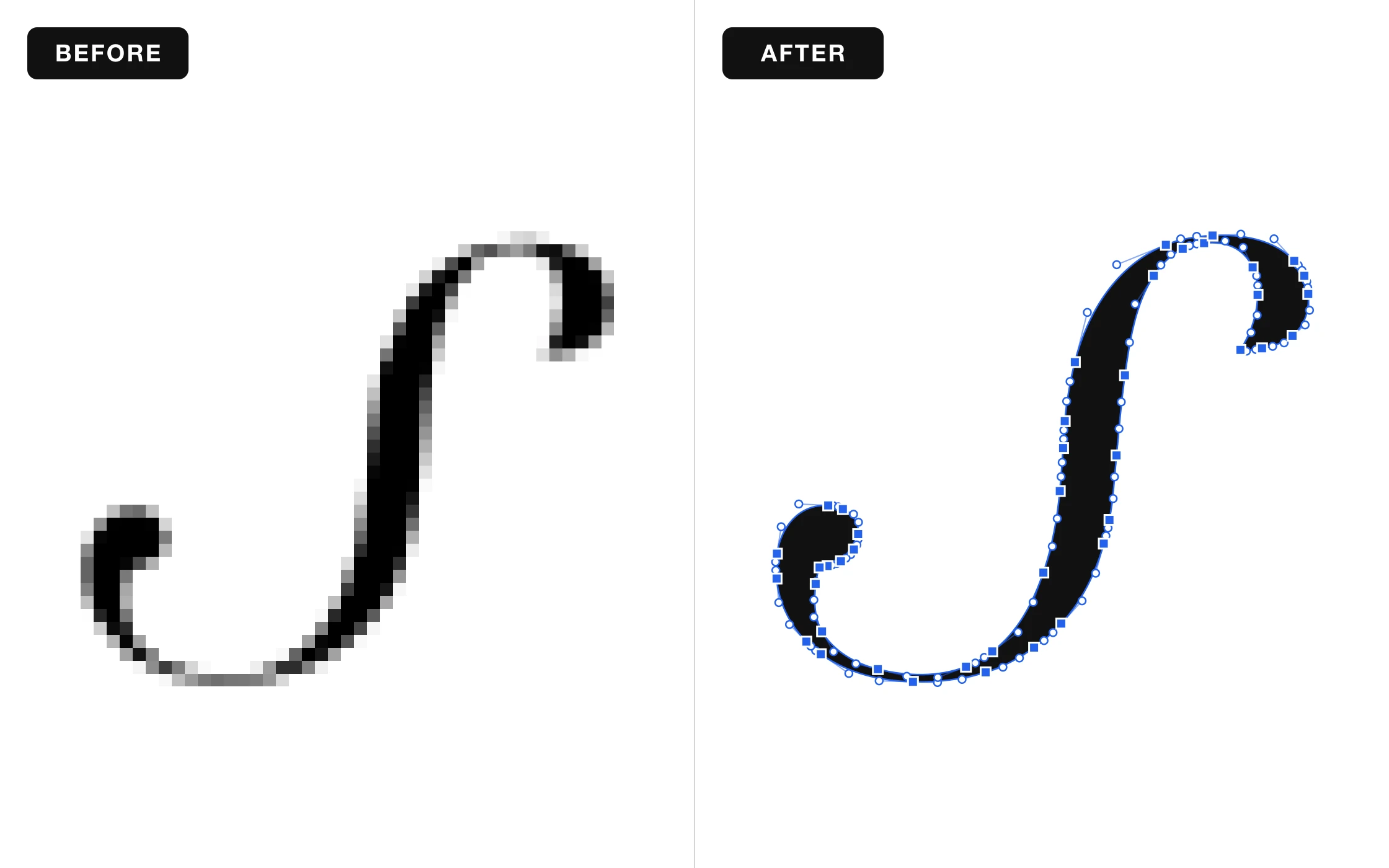
Hi everyone! We have two nice improvements for you today.
Smoother, Cleaner SVG Files
Your SVG files now come out smoother and cleaner. Curves look more natural, edges stay sharp, and your designs are easier to edit and ready for your Cricut, laser, or printer.
Upload Photos from Your iPhone
You can now upload iPhone photos (HEIC) directly. No need to convert them first, just pick a photo and start creating.
Nothing to set up, it all works automatically. Happy creating! ❤️
Smoother SVG Files and iPhone Photo Uploads
Hi everyone! We have two nice improvements for you today.
Smoother, Cleaner SVG Files
Your SVG files now come out smoother and cleaner. Curves look more natural, edges stay sharp, and your designs are easier to edit and ready for your Cricut, laser, or printer.
Upload Photos from Your iPhone
You can now upload iPhone photos (HEIC) directly. No need to convert them first, just pick a photo and start creating.
Nothing to set up, it all works automatically. Happy creating! ❤️
Give Your Photos a Goofy Side with Goofy Doodle
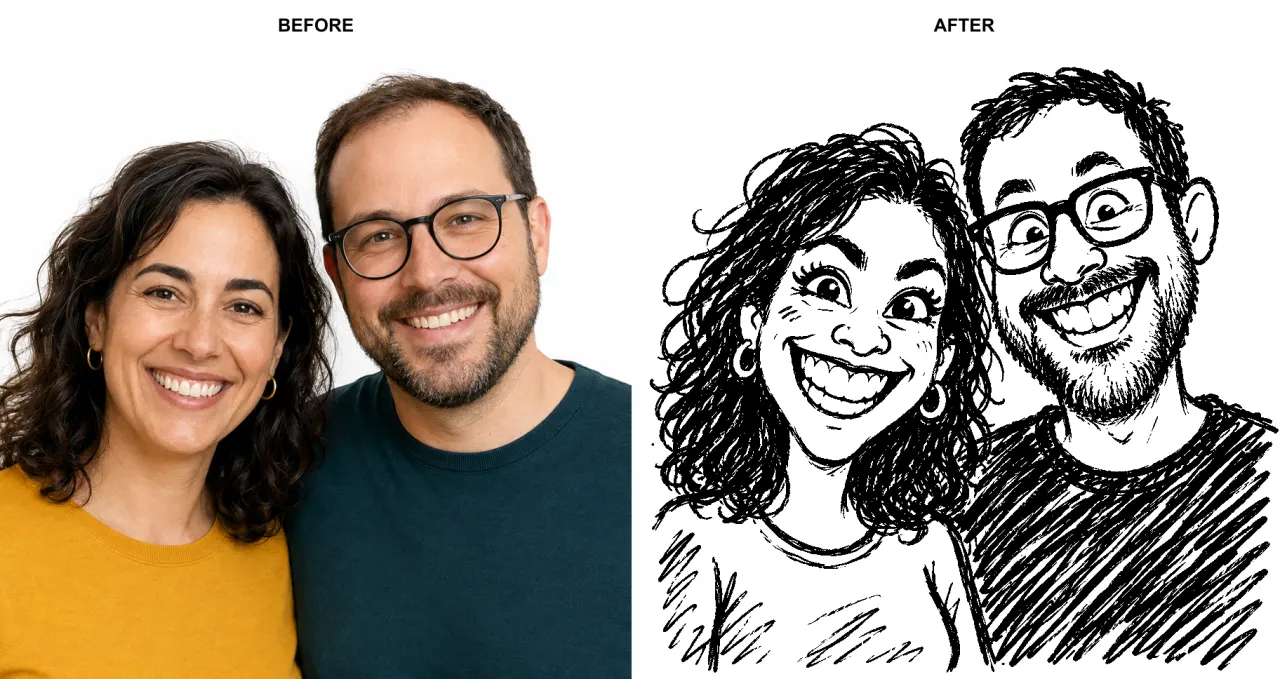
Hi everyone! Meet Goofy Doodle, our new style for turning your photos and ideas into funny, deliberately imperfect drawings.
Familiar faces get a wonderfully silly twist, with big grins, exaggerated expressions, and the charm of a quick sketch made to make you laugh. The aim is to keep the resemblance while bringing out the funny side.
See the transformation in the before-and-after example above, then try your own.
Upload an image or describe your idea, choose Goofy Doodle in the workspace, and let the doodling begin.
Happy creating! ❤️
Give Your Photos a Goofy Side with Goofy Doodle
Hi everyone! Meet Goofy Doodle, our new style for turning your photos and ideas into funny, deliberately imperfect drawings.
Familiar faces get a wonderfully silly twist, with big grins, exaggerated expressions, and the charm of a quick sketch made to make you laugh. The aim is to keep the resemblance while bringing out the funny side.
See the transformation in the before-and-after example above, then try your own.
Upload an image or describe your idea, choose Goofy Doodle in the workspace, and let the doodling begin.
Happy creating! ❤️
Introducing the Scratchboard Style
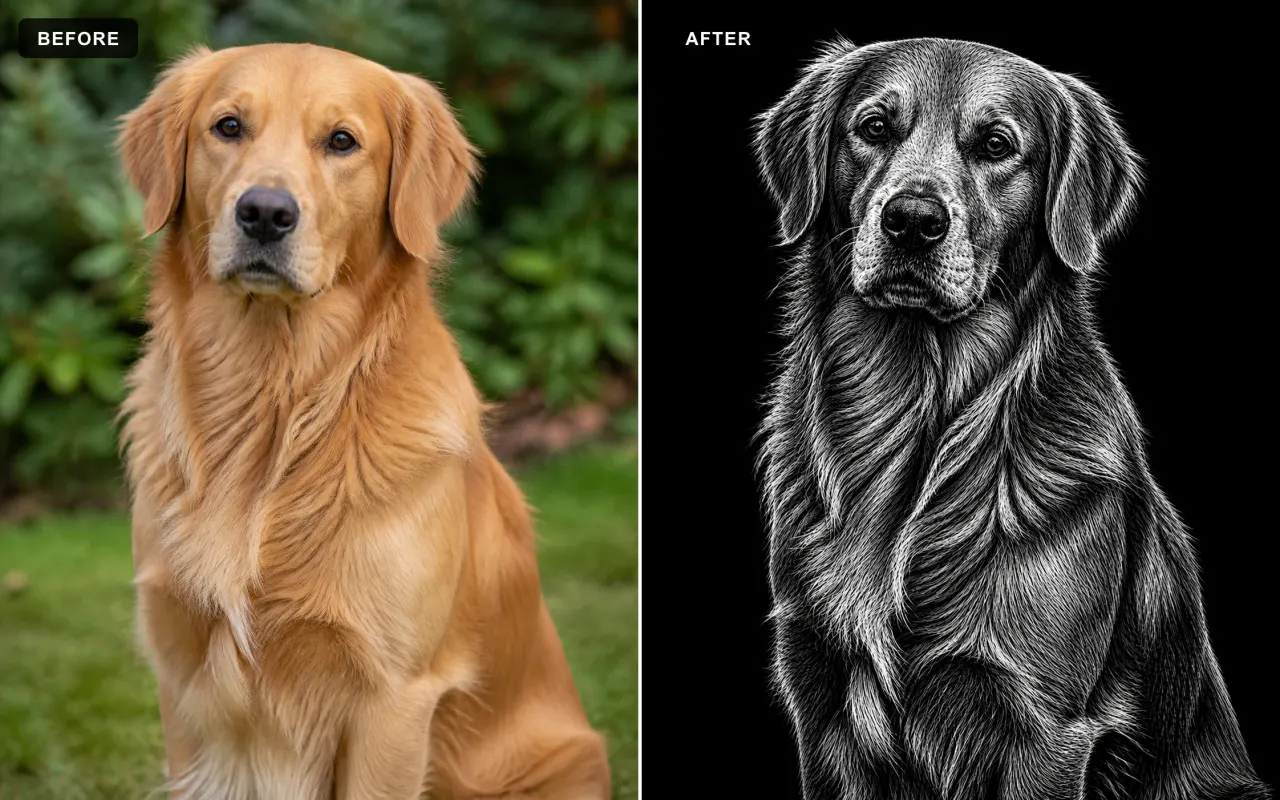
Hi everyone! We’ve added Scratchboard, a new style that gives your ideas and uploaded images the unmistakable look of artwork scratched from black ink.
What Is Scratchboard?
Traditional scratchboard starts with a white clay-coated board covered in black ink. Artists use sharp tools to remove the black surface and reveal the white layer underneath. Every highlight, texture, and fine detail is created through the marks that are scratched away.
White Marks, Deep Black
Our Scratchboard style recreates that reverse-drawing process digitally. Fine white scratches shape fur, hair, faces, fabric, metal, and scenery against a rich black surface. More marks reveal the light, while untouched areas stay black, producing dramatic contrast and a classic engraved finish.
Create from a Prompt or an Image
Describe what you want to create, or upload an image and Scratchboard will rebuild the subject and scene in this carved black-and-white technique. It is more than a black-and-white filter: the image is recreated through thousands of fine scratch marks. Ask to remove the background and your subject will appear against a clean solid-black backdrop.
Made for Bold, Detailed Artwork
Scratchboard works especially well for portraits, pets, wildlife, gothic themes, emblems, keepsakes, posters, and engraving-inspired designs.
Open the workspace and try Scratchboard today. Happy creating! ❤️
Introducing the Scratchboard Style
Hi everyone! We’ve added Scratchboard, a new style that gives your ideas and uploaded images the unmistakable look of artwork scratched from black ink.
What Is Scratchboard?
Traditional scratchboard starts with a white clay-coated board covered in black ink. Artists use sharp tools to remove the black surface and reveal the white layer underneath. Every highlight, texture, and fine detail is created through the marks that are scratched away.
White Marks, Deep Black
Our Scratchboard style recreates that reverse-drawing process digitally. Fine white scratches shape fur, hair, faces, fabric, metal, and scenery against a rich black surface. More marks reveal the light, while untouched areas stay black, producing dramatic contrast and a classic engraved finish.
Create from a Prompt or an Image
Describe what you want to create, or upload an image and Scratchboard will rebuild the subject and scene in this carved black-and-white technique. It is more than a black-and-white filter: the image is recreated through thousands of fine scratch marks. Ask to remove the background and your subject will appear against a clean solid-black backdrop.
Made for Bold, Detailed Artwork
Scratchboard works especially well for portraits, pets, wildlife, gothic themes, emblems, keepsakes, posters, and engraving-inspired designs.
Open the workspace and try Scratchboard today. Happy creating! ❤️
Maak kennis met de Stipple stijl
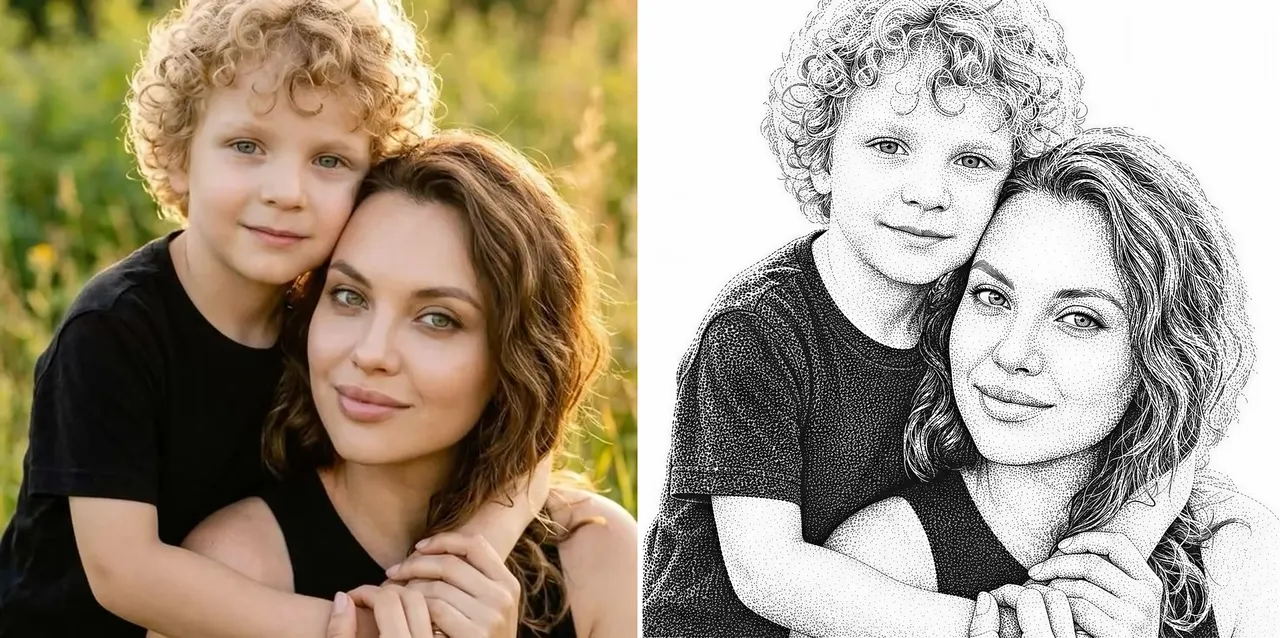
Hallo allemaal! We hebben zojuist Stipple toegevoegd, een nieuwe stijl die je prompts en foto's omzet in klassieke stippelgravures. Het is dezelfde dotwork-techniek die je kent van portretten op bankbiljetten en vintage drukwerk.
Toon volledig opgebouwd uit stippen
Stipple tekent elke afbeelding met duizenden kleine zwarte inktstippen. Dichte clusters vormen de schaduwen, schaarse stippen houden de hooglichten luchtig, en korte gerichte streekjes vormen haar en wimpers. Het werkt prachtig voor portretten, huisdieren en gedetailleerde aandenkens.
Gemaakt voor lasergraveren
Het artwork bestaat al uit pure stippen op een strakke witte achtergrond, dus het brandt geweldig op hout, leer en leisteen zonder extra dithering-instellingen.
Maak van een prompt of een afbeelding
Beschrijf wat je wilt maken, of upload een foto en Stipple tekent hem opnieuw met behoud van onderwerp, pose en kadrering. Kies Stipple in de workspace en genereer zoals gewoonlijk.
Open de workspace en probeer Stipple vandaag nog. Veel creatief plezier! ❤️
Maak kennis met de Stipple stijl
Hallo allemaal! We hebben zojuist Stipple toegevoegd, een nieuwe stijl die je prompts en foto's omzet in klassieke stippelgravures. Het is dezelfde dotwork-techniek die je kent van portretten op bankbiljetten en vintage drukwerk.
Toon volledig opgebouwd uit stippen
Stipple tekent elke afbeelding met duizenden kleine zwarte inktstippen. Dichte clusters vormen de schaduwen, schaarse stippen houden de hooglichten luchtig, en korte gerichte streekjes vormen haar en wimpers. Het werkt prachtig voor portretten, huisdieren en gedetailleerde aandenkens.
Gemaakt voor lasergraveren
Het artwork bestaat al uit pure stippen op een strakke witte achtergrond, dus het brandt geweldig op hout, leer en leisteen zonder extra dithering-instellingen.
Maak van een prompt of een afbeelding
Beschrijf wat je wilt maken, of upload een foto en Stipple tekent hem opnieuw met behoud van onderwerp, pose en kadrering. Kies Stipple in de workspace en genereer zoals gewoonlijk.
Open de workspace en probeer Stipple vandaag nog. Veel creatief plezier! ❤️
SVG Editor: wit verwijderen met één klik
Hallo allemaal! We hebben de SVG Editor verbeterd met een nieuwe opschoning in één klik voor zwart-wit-SVG's.
Wit verwijderen met één klik
Open een SVG en klik op Remove White in de bovenste werkbalk. De editor wist witte vormen in het hele ontwerp en behoudt het zwarte artwork.
Schone transparante uitsnedes
Witte gebieden worden echte transparante negatieve ruimte in plaats van simpelweg een andere kleur, waardoor het resultaat klaar is voor lasersnijden, vinyl, printen en verdere bewerking.
Werkt op complexe SVG's
De opschoning verwerkt artwork met meerdere paden in één keer en voegt het resultaat samen tot één samengesteld pad voor een opgeruimder Objects-paneel.
Undo en redo inbegrepen
De bewerking wordt toegevoegd aan de editorgeschiedenis, dus je kunt hem terugdraaien of opnieuw toepassen wanneer je maar wilt.
Open een ontwerp in de SVG Editor en probeer Remove White in de bovenste werkbalk. Veel creatief plezier! ❤️
SVG Editor: wit verwijderen met één klik
Hallo allemaal! We hebben de SVG Editor verbeterd met een nieuwe opschoning in één klik voor zwart-wit-SVG's.
Wit verwijderen met één klik
Open een SVG en klik op Remove White in de bovenste werkbalk. De editor wist witte vormen in het hele ontwerp en behoudt het zwarte artwork.
Schone transparante uitsnedes
Witte gebieden worden echte transparante negatieve ruimte in plaats van simpelweg een andere kleur, waardoor het resultaat klaar is voor lasersnijden, vinyl, printen en verdere bewerking.
Werkt op complexe SVG's
De opschoning verwerkt artwork met meerdere paden in één keer en voegt het resultaat samen tot één samengesteld pad voor een opgeruimder Objects-paneel.
Undo en redo inbegrepen
De bewerking wordt toegevoegd aan de editorgeschiedenis, dus je kunt hem terugdraaien of opnieuw toepassen wanneer je maar wilt.
Open een ontwerp in de SVG Editor en probeer Remove White in de bovenste werkbalk. Veel creatief plezier! ❤️
Maak kennis met de Halftone Generator
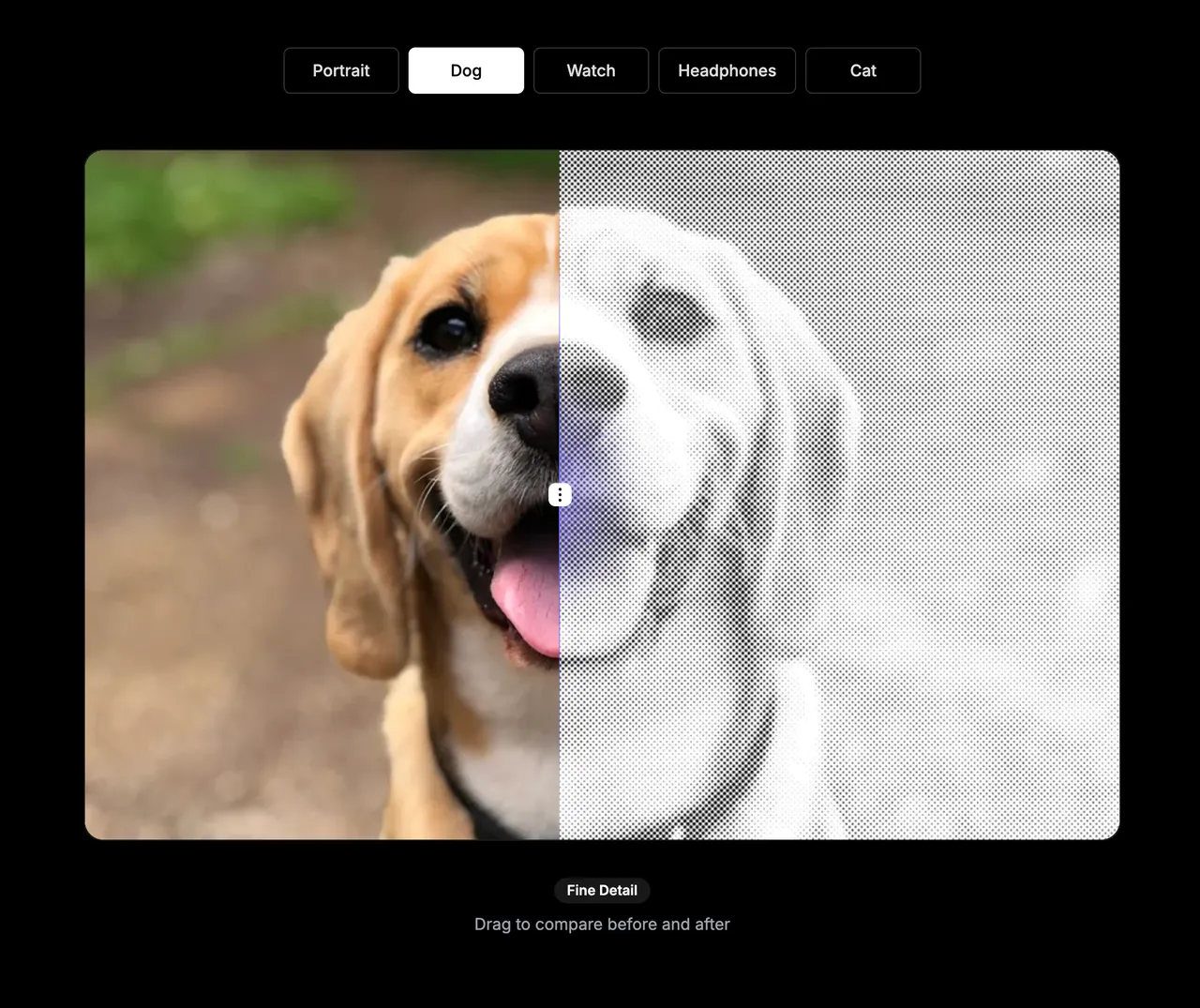
Halftoon is een techniek die een afbeelding omzet in een patroon van stippen, vierkanten of lijnen. Donkere delen gebruiken grotere of dichter op elkaar staande markeringen, lichtere delen kleinere of verder uit elkaar staande. De techniek wordt veel gebruikt in drukwerk, posters, gravures en decoratief ontwerp.
We hebben een nieuwe Halftone Generator aan VectorWitch toegevoegd. Zet elke foto of afbeelding om in een aanpasbaar halftoonontwerp, rechtstreeks in je browser.
Kies je halftoonstijl
Maak klassieke stippenpatronen, krachtige vierkantpatronen of halftonen op basis van lijnen. Pas de tussenruimte, hoek, stip- of lijnschaal, helderheid, contrast en inversie aan tot het resultaat goed voelt.
Zie elke wijziging direct
Upload een JPG-, PNG- of WebP-afbeelding en zie het effect in realtime veranderen. Je bronafbeelding blijft op je apparaat, dus je kunt snel en privé experimenteren.
Begin met presets
Gebruik een preset voor fijne details, een krachtige posterlook of lijngravure, en stel de instellingen daarna fijner af om je eigen stijl te maken.
Exporteer het resultaat zoals jij wilt
Download je voltooide halftoon als PNG-, JPG-, BMP- of SVG-bestand. De SVG-export maakt een vectorgebaseerd patroon dat handig is voor verdere bewerking, terwijl de rasterformaten praktisch zijn voor alledaagse ontwerp- en beeldworkflows.
Gratis te gebruiken
De Halftone Generator is helemaal gratis en gebruikt geen credits. Open hem via het Tools-menu en maak van je volgende afbeelding een halftoonontwerp.
Veel plezier met creëren! ❤️
Maak kennis met de Halftone Generator
Halftoon is een techniek die een afbeelding omzet in een patroon van stippen, vierkanten of lijnen. Donkere delen gebruiken grotere of dichter op elkaar staande markeringen, lichtere delen kleinere of verder uit elkaar staande. De techniek wordt veel gebruikt in drukwerk, posters, gravures en decoratief ontwerp.
We hebben een nieuwe Halftone Generator aan VectorWitch toegevoegd. Zet elke foto of afbeelding om in een aanpasbaar halftoonontwerp, rechtstreeks in je browser.
Kies je halftoonstijl
Maak klassieke stippenpatronen, krachtige vierkantpatronen of halftonen op basis van lijnen. Pas de tussenruimte, hoek, stip- of lijnschaal, helderheid, contrast en inversie aan tot het resultaat goed voelt.
Zie elke wijziging direct
Upload een JPG-, PNG- of WebP-afbeelding en zie het effect in realtime veranderen. Je bronafbeelding blijft op je apparaat, dus je kunt snel en privé experimenteren.
Begin met presets
Gebruik een preset voor fijne details, een krachtige posterlook of lijngravure, en stel de instellingen daarna fijner af om je eigen stijl te maken.
Exporteer het resultaat zoals jij wilt
Download je voltooide halftoon als PNG-, JPG-, BMP- of SVG-bestand. De SVG-export maakt een vectorgebaseerd patroon dat handig is voor verdere bewerking, terwijl de rasterformaten praktisch zijn voor alledaagse ontwerp- en beeldworkflows.
Gratis te gebruiken
De Halftone Generator is helemaal gratis en gebruikt geen credits. Open hem via het Tools-menu en maak van je volgende afbeelding een halftoonontwerp.
Veel plezier met creëren! ❤️
Maak kennis met de Master Pencil stijl
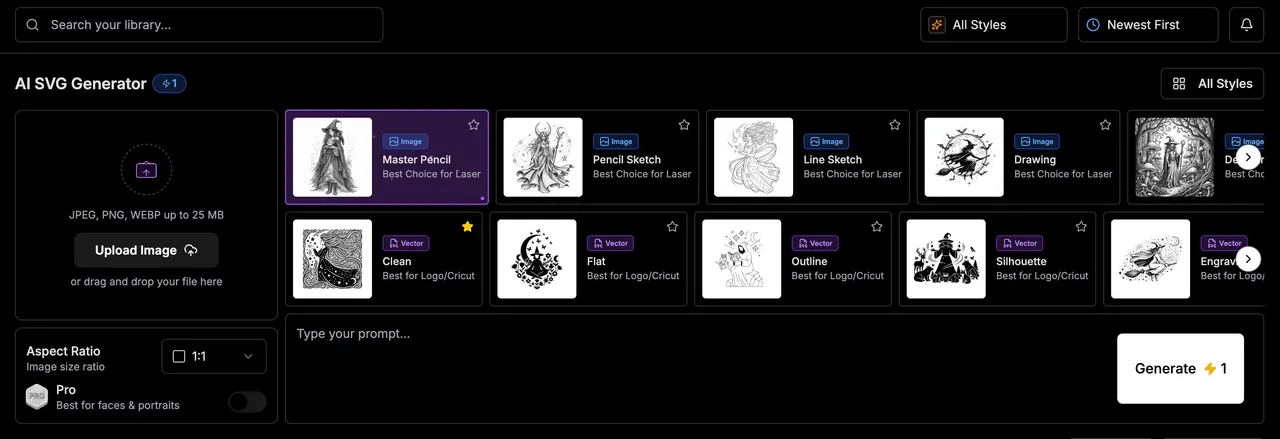
Hallo allemaal! We hebben Master Pencil toegevoegd, een nieuwe stijl voor verfijnde monochrome grafietkunst met rijke details en een natuurlijke, handgetekende afwerking.
Gedetailleerde grafietkunst
Master Pencil combineert nauwkeurige contouren, gelaagde potloodschaduwen, arcering en subtiele papiertextuur tot verzorgde zwart-witillustraties. De stijl werkt bijzonder goed voor portretten, personages, dieren, architectuur en decoratief werk.
Maak van een prompt of een afbeelding
Beschrijf wat je wilt maken, of upload een afbeelding om die te transformeren met behoud van onderwerp, pose, kadrering en belangrijke details. Kies Master Pencil in de workspace en genereer zoals gewoonlijk.
Open de workspace en probeer Master Pencil vandaag nog. Veel creatief plezier! ❤️
Maak kennis met de Master Pencil stijl
Hallo allemaal! We hebben Master Pencil toegevoegd, een nieuwe stijl voor verfijnde monochrome grafietkunst met rijke details en een natuurlijke, handgetekende afwerking.
Gedetailleerde grafietkunst
Master Pencil combineert nauwkeurige contouren, gelaagde potloodschaduwen, arcering en subtiele papiertextuur tot verzorgde zwart-witillustraties. De stijl werkt bijzonder goed voor portretten, personages, dieren, architectuur en decoratief werk.
Maak van een prompt of een afbeelding
Beschrijf wat je wilt maken, of upload een afbeelding om die te transformeren met behoud van onderwerp, pose, kadrering en belangrijke details. Kies Master Pencil in de workspace en genereer zoals gewoonlijk.
Open de workspace en probeer Master Pencil vandaag nog. Veel creatief plezier! ❤️
SVG Editor: teksttransformaties
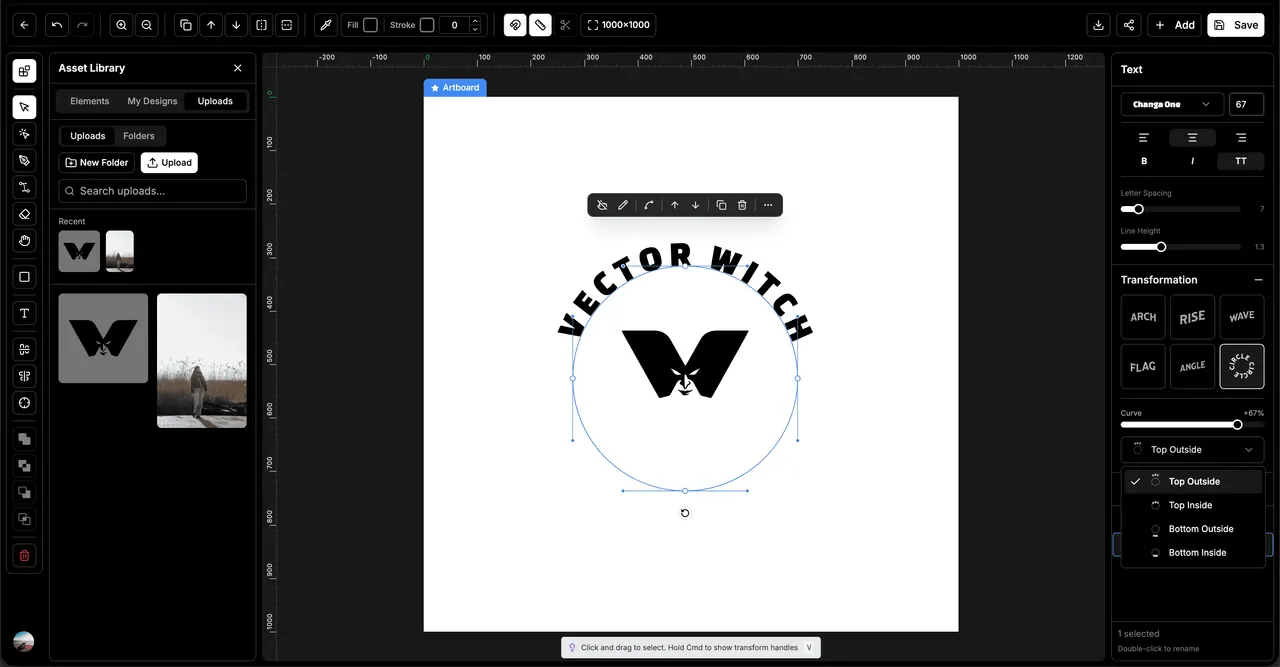
Hallo allemaal! We hebben bewerkbare teksttransformaties aan de SVG Editor toegevoegd. Je kunt tekst nu buigen en vormen terwijl het originele lettertype en de inhoud bewerkbaar blijven.
Zes transformatiestijlen
Kies uit Arch, Rise, Wave, Flag, Angle en Circle. Gebruik de Curve-schuif om het effect fijn af te stellen en maak alles van subtiele buigingen tot gedurfde, expressieve typografie.
Flexibele cirkeltekst
Cirkeltekst heeft nu vier nauwkeurige plaatsingsopties: Top Outside, Top Inside, Bottom Outside en Bottom Inside. Kies een positie in de nieuwe dropdown en bouw badges, zegels, logo's en ronde ontwerpen precies zoals jij wilt.
Houd je lettertypen bewerkbaar
Transformaties behouden je originele tekst, lettertype, gewicht, stijl, spatiëring en uitlijning. Je kunt de tekst of het lettertype later wijzigen zonder het ontwerp opnieuw te bouwen of elke letter om te zetten in een apart pad.
Betrouwbaar groeperen en geschiedenis
Groeperen, degroeperen, undo en redo houden getransformeerde tekst nu bij elkaar als één bewerkbaar object. Je letters blijven georganiseerd, en bij het doorlopen van je bewerkingsgeschiedenis worden elke transformatie en cirkelplaatsing correct hersteld.
Open een ontwerp in de SVG Editor, selecteer een tekstobject en verken het nieuwe transformatiepaneel. Veel creatief plezier! ❤️
SVG Editor: teksttransformaties
Hallo allemaal! We hebben bewerkbare teksttransformaties aan de SVG Editor toegevoegd. Je kunt tekst nu buigen en vormen terwijl het originele lettertype en de inhoud bewerkbaar blijven.
Zes transformatiestijlen
Kies uit Arch, Rise, Wave, Flag, Angle en Circle. Gebruik de Curve-schuif om het effect fijn af te stellen en maak alles van subtiele buigingen tot gedurfde, expressieve typografie.
Flexibele cirkeltekst
Cirkeltekst heeft nu vier nauwkeurige plaatsingsopties: Top Outside, Top Inside, Bottom Outside en Bottom Inside. Kies een positie in de nieuwe dropdown en bouw badges, zegels, logo's en ronde ontwerpen precies zoals jij wilt.
Houd je lettertypen bewerkbaar
Transformaties behouden je originele tekst, lettertype, gewicht, stijl, spatiëring en uitlijning. Je kunt de tekst of het lettertype later wijzigen zonder het ontwerp opnieuw te bouwen of elke letter om te zetten in een apart pad.
Betrouwbaar groeperen en geschiedenis
Groeperen, degroeperen, undo en redo houden getransformeerde tekst nu bij elkaar als één bewerkbaar object. Je letters blijven georganiseerd, en bij het doorlopen van je bewerkingsgeschiedenis worden elke transformatie en cirkelplaatsing correct hersteld.
Open een ontwerp in de SVG Editor, selecteer een tekstobject en verken het nieuwe transformatiepaneel. Veel creatief plezier! ❤️
Maak kennis met meertalige ondersteuning
Hallo allemaal! VectorWitch is nu beschikbaar in 8 talen, zodat je kunt creëren in de taal waarin jij je het prettigst voelt.
Kies je taal
Kies je taal via het vlaggenmenu in de bovenbalk. Op mobiel vind je het in de bovenbalk en ook bovenaan het menu. Je keuze wordt onthouden voor volgende bezoeken.
Acht talen, volledig vertaald
English, Deutsch, Español, Français, Italiano, Português, Nederlands en Polski. De hele interface is vertaald, van de workspace en de editor tot tools, prijzen en helppagina's.
Veel creatief plezier! ❤️
Maak kennis met meertalige ondersteuning
Hallo allemaal! VectorWitch is nu beschikbaar in 8 talen, zodat je kunt creëren in de taal waarin jij je het prettigst voelt.
Kies je taal
Kies je taal via het vlaggenmenu in de bovenbalk. Op mobiel vind je het in de bovenbalk en ook bovenaan het menu. Je keuze wordt onthouden voor volgende bezoeken.
Acht talen, volledig vertaald
English, Deutsch, Español, Français, Italiano, Português, Nederlands en Polski. De hele interface is vertaald, van de workspace en de editor tot tools, prijzen en helppagina's.
Veel creatief plezier! ❤️